O Jake's Resume é um dos modelos de currículo em LaTeX mais populares já criados. Criado por Jake Gutierrez com base no currículo de sb2nov, ele conquistou mais de 2.800 estrelas no GitHub e se tornou uma recomendação padrão nas comunidades de currículos por seu design limpo, de coluna única e compatível com ATS.
O YAMLResume adotou o Jake's Resume como modelo oficial de LaTeX na v0.12. Neste post, mostraremos como fica o Jake's Resume no YAMLResume e — mais importante — o que o YAMLResume melhora em relação ao modelo original.
O Jake's Resume original
O modelo original é um único arquivo resume.tex. Antes de escrever uma
única palavra de conteúdo, você precisa atravessar cerca de 100 linhas de
preâmbulo: pacotes, ajustes de margem, formatação de seções e uma família de
macros personalizadas como \resumeSubheading, \resumeItem e
\resumeProjectHeading.
O conteúdo é então escrito diretamente em LaTeX:
\section{Education}
  \resumeSubHeadingListStart
    \resumeSubheading
      {Southwestern University}{Georgetown, TX}
      {Bachelor of Arts in Computer Science, Minor in Business}{Aug. 2018 -- May 2021}
  \resumeSubHeadingListEnd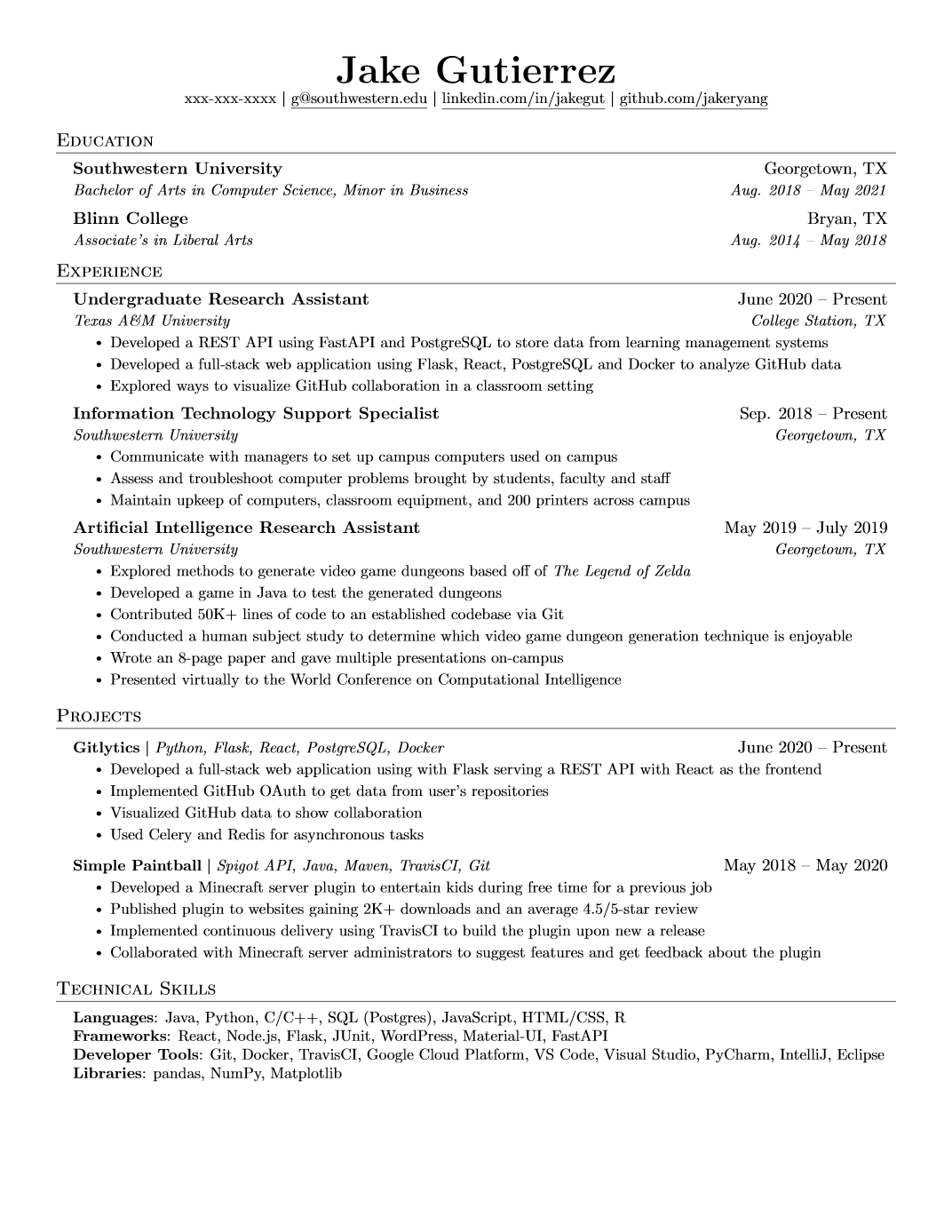
O resultado é bonito, mas a experiência de criação é LaTeX puro: você digita
manualmente cada intervalo de datas, escapa cada caractere especial (Texas A\&M University) e depura chaves desencontradas por meio dos logs de erro
notoriamente crípticos do LaTeX. Quer uma fonte diferente? Comente e
descomente linhas de \usepackage. Quer um segundo idioma? Reescreva o
arquivo.
Para os curiosos, aqui está o código-fonte completo do resume.tex, com 218
linhas:
O Jake's Resume original — código-fonte LaTeX completo (218 linhas)
%-------------------------
% Resume in Latex
% Author : Jake Gutierrez
% Based off of: https://github.com/sb2nov/resume
% License : MIT
%------------------------

\documentclass[letterpaper,11pt]{article}

\usepackage{latexsym}
\usepackage[empty]{fullpage}
\usepackage{titlesec}
\usepackage{marvosym}
\usepackage[usenames,dvipsnames]{color}
\usepackage{verbatim}
\usepackage{enumitem}
\usepackage[hidelinks]{hyperref}
\usepackage{fancyhdr}
\usepackage[english]{babel}
\usepackage{tabularx}
\input{glyphtounicode}


%----------FONT OPTIONS----------
% sans-serif
% \usepackage[sfdefault]{FiraSans}
% \usepackage[sfdefault]{roboto}
% \usepackage[sfdefault]{noto-sans}
% \usepackage[default]{sourcesanspro}

% serif
% \usepackage{CormorantGaramond}
% \usepackage{charter}


\pagestyle{fancy}
\fancyhf{} % clear all header and footer fields
\fancyfoot{}
\renewcommand{\headrulewidth}{0pt}
\renewcommand{\footrulewidth}{0pt}

% Adjust margins
\addtolength{\oddsidemargin}{-0.5in}
\addtolength{\evensidemargin}{-0.5in}
\addtolength{\textwidth}{1in}
\addtolength{\topmargin}{-.5in}
\addtolength{\textheight}{1.0in}

\urlstyle{same}

\raggedbottom
\raggedright
\setlength{\tabcolsep}{0in}

% Sections formatting
\titleformat{\section}{
  \vspace{-4pt}\scshape\raggedright\large
}{}{0em}{}[\color{black}\titlerule \vspace{-5pt}]

% Ensure that generate pdf is machine readable/ATS parsable
\pdfgentounicode=1

%-------------------------
% Custom commands
\newcommand{\resumeItem}[1]{
  \item\small{
    {#1 \vspace{-2pt}}
  }
}

\newcommand{\resumeSubheading}[4]{
  \vspace{-2pt}\item
    \begin{tabular*}{0.97\textwidth}[t]{l@{\extracolsep{\fill}}r}
      \textbf{#1} & #2 \\
      \textit{\small#3} & \textit{\small #4} \\
    \end{tabular*}\vspace{-7pt}
}

\newcommand{\resumeSubSubheading}[2]{
    \item
    \begin{tabular*}{0.97\textwidth}{l@{\extracolsep{\fill}}r}
      \textit{\small#1} & \textit{\small #2} \\
    \end{tabular*}\vspace{-7pt}
}

\newcommand{\resumeProjectHeading}[2]{
    \item
    \begin{tabular*}{0.97\textwidth}{l@{\extracolsep{\fill}}r}
      \small#1 & #2 \\
    \end{tabular*}\vspace{-7pt}
}

\newcommand{\resumeSubItem}[1]{\resumeItem{#1}\vspace{-4pt}}

\renewcommand\labelitemii{$\vcenter{\hbox{\tiny$\bullet$}}$}

\newcommand{\resumeSubHeadingListStart}{\begin{itemize}[leftmargin=0.15in, label={}]}
\newcommand{\resumeSubHeadingListEnd}{\end{itemize}}
\newcommand{\resumeItemListStart}{\begin{itemize}}
\newcommand{\resumeItemListEnd}{\end{itemize}\vspace{-5pt}}

%-------------------------------------------
%%%%%%  RESUME STARTS HERE  %%%%%%%%%%%%%%%%%%%%%%%%%%%%


\begin{document}

%----------HEADING----------
% \begin{tabular*}{\textwidth}{l@{\extracolsep{\fill}}r}
%   \textbf{\href{http://sourabhbajaj.com/}{\Large Sourabh Bajaj}} & Email : \href{mailto:sourabh@sourabhbajaj.com}{sourabh@sourabhbajaj.com}\\
%   \href{http://sourabhbajaj.com/}{http://www.sourabhbajaj.com} & Mobile : +1-123-456-7890 \\
% \end{tabular*}

\begin{center}
    \textbf{\Huge \scshape Jake Ryan} \\ \vspace{1pt}
    \small 123-456-7890 $|$ \href{mailto:x@x.com}{\underline{jake@su.edu}} $|$
    \href{https://linkedin.com/in/...}{\underline{linkedin.com/in/jake}} $|$
    \href{https://github.com/...}{\underline{github.com/jake}}
\end{center}


%-----------EDUCATION-----------
\section{Education}
  \resumeSubHeadingListStart
    \resumeSubheading
      {Southwestern University}{Georgetown, TX}
      {Bachelor of Arts in Computer Science, Minor in Business}{Aug. 2018 -- May 2021}
    \resumeSubheading
      {Blinn College}{Bryan, TX}
      {Associate's in Liberal Arts}{Aug. 2014 -- May 2018}
  \resumeSubHeadingListEnd


%-----------EXPERIENCE-----------
\section{Experience}
  \resumeSubHeadingListStart

    \resumeSubheading
      {Undergraduate Research Assistant}{June 2020 -- Present}
      {Texas A\&M University}{College Station, TX}
      \resumeItemListStart
        \resumeItem{Developed a REST API using FastAPI and PostgreSQL to store data from learning management systems}
        \resumeItem{Developed a full-stack web application using Flask, React, PostgreSQL and Docker to analyze GitHub data}
        \resumeItem{Explored ways to visualize GitHub collaboration in a classroom setting}
      \resumeItemListEnd

% -----------Multiple Positions Heading-----------
%    \resumeSubSubheading
%     {Software Engineer I}{Oct 2014 - Sep 2016}
%     \resumeItemListStart
%        \resumeItem{Apache Beam}
%          {Apache Beam is a unified model for defining both batch and streaming data-parallel processing pipelines}
%     \resumeItemListEnd
%    \resumeSubHeadingListEnd
%-------------------------------------------

    \resumeSubheading
      {Information Technology Support Specialist}{Sep. 2018 -- Present}
      {Southwestern University}{Georgetown, TX}
      \resumeItemListStart
        \resumeItem{Communicate with managers to set up campus computers used on campus}
        \resumeItem{Assess and troubleshoot computer problems brought by students, faculty and staff}
        \resumeItem{Maintain upkeep of computers, classroom equipment, and 200 printers across campus}
    \resumeItemListEnd

    \resumeSubheading
      {Artificial Intelligence Research Assistant}{May 2019 -- July 2019}
      {Southwestern University}{Georgetown, TX}
      \resumeItemListStart
        \resumeItem{Explored methods to generate video game dungeons based off of \emph{The Legend of Zelda}}
        \resumeItem{Developed a game in Java to test the generated dungeons}
        \resumeItem{Contributed 50K+ lines of code to an established codebase via Git}
        \resumeItem{Conducted  a human subject study to determine which video game dungeon generation technique is enjoyable}
        \resumeItem{Wrote an 8-page paper and gave multiple presentations on-campus}
        \resumeItem{Presented virtually to the World Conference on Computational Intelligence}
      \resumeItemListEnd

  \resumeSubHeadingListEnd


%-----------PROJECTS-----------
\section{Projects}
    \resumeSubHeadingListStart
      \resumeProjectHeading
          {\textbf{Gitlytics} $|$ \emph{Python, Flask, React, PostgreSQL, Docker}}{June 2020 -- Present}
          \resumeItemListStart
            \resumeItem{Developed a full-stack web application using with Flask serving a REST API with React as the frontend}
            \resumeItem{Implemented GitHub OAuth to get data from user’s repositories}
            \resumeItem{Visualized GitHub data to show collaboration}
            \resumeItem{Used Celery and Redis for asynchronous tasks}
          \resumeItemListEnd
      \resumeProjectHeading
          {\textbf{Simple Paintball} $|$ \emph{Spigot API, Java, Maven, TravisCI, Git}}{May 2018 -- May 2020}
          \resumeItemListStart
            \resumeItem{Developed a Minecraft server plugin to entertain kids during free time for a previous job}
            \resumeItem{Published plugin to websites gaining 2K+ downloads and an average 4.5/5-star review}
            \resumeItem{Implemented continuous delivery using TravisCI to build the plugin upon new a release}
            \resumeItem{Collaborated with Minecraft server administrators to suggest features and get feedback about the plugin}
          \resumeItemListEnd
    \resumeSubHeadingListEnd


%
%-----------PROGRAMMING SKILLS-----------
\section{Technical Skills}
 \begin{itemize}[leftmargin=0.15in, label={}]
    \small{\item{
     \textbf{Languages}{: Java, Python, C/C++, SQL (Postgres), JavaScript, HTML/CSS, R} \\
     \textbf{Frameworks}{: React, Node.js, Flask, JUnit, WordPress, Material-UI, FastAPI} \\
     \textbf{Developer Tools}{: Git, Docker, TravisCI, Google Cloud Platform, VS Code, Visual Studio, PyCharm, IntelliJ, Eclipse} \\
     \textbf{Libraries}{: pandas, NumPy, Matplotlib}
    }}
 \end{itemize}


%-------------------------------------------
\end{document}
Jake's Resume no YAMLResume
No YAMLResume, o mesmo currículo é YAML puro e estruturado. Aqui está o currículo de Jake Ryan, reescrito:
# yaml-language-server: $schema=https://yamlresume.dev/schema.json

---
content:
  basics:
    name: Jake Ryan
    phone: 123-456-7890
    email: jake@su.edu
  profiles:
    - network: LinkedIn
      url: https://linkedin.com/in/jake
      username: linkedin.com/in/jake
    - network: GitHub
      url: https://github.com/jake
      username: github.com/jake
  education:
    - institution: Southwestern University
      degree: Bachelor
      area: Computer Science, Minor in Business
      startDate: Aug 2018
      endDate: May 2021
    - institution: Blinn College
      degree: Associate
      area: Liberal Arts
      startDate: Aug 2014
      endDate: May 2018
  work:
    - name: Texas A&M University
      position: Undergraduate Research Assistant
      startDate: Jun 2020
      summary: |
        - Developed a REST API using **FastAPI** and **PostgreSQL** to store data from learning management systems
        - Developed a full-stack web application using Flask, React, PostgreSQL and Docker to analyze GitHub data
        - Explored ways to visualize GitHub collaboration in a classroom setting
    - name: Southwestern University
      position: Information Technology Support Specialist
      startDate: Sep 2018
      summary: |
        - Communicate with managers to set up campus computers used on campus
        - Assess and troubleshoot computer problems brought by students, faculty and staff
        - Maintain upkeep of computers, classroom equipment, and 200 printers across campus
    - name: Southwestern University
      position: Artificial Intelligence Research Assistant
      startDate: May 2019
      endDate: Jul 2019
      summary: |
        - Explored methods to generate video game dungeons based off of *The Legend of Zelda*
        - Developed a game in Java to test the generated dungeons
        - Contributed 50K+ lines of code to an established codebase via Git
        - Conducted a human subject study to determine which video game dungeon generation technique is enjoyable
        - Wrote an 8-page paper and gave multiple presentations on-campus
        - Presented virtually to the World Conference on Computational Intelligence
  projects:
    - name: Gitlytics
      description: Python, Flask, React, PostgreSQL, Docker
      startDate: Jun 2020
      summary: |
        - Developed a full-stack web application with Flask serving a REST API and React as the frontend
        - Implemented GitHub OAuth to get data from user repositories
        - Visualized GitHub data to show collaboration
        - Used Celery and Redis for asynchronous tasks
    - name: Simple Paintball
      description: Spigot API, Java, Maven, TravisCI, Git
      startDate: May 2018
      endDate: May 2020
      summary: |
        - Developed a Minecraft server plugin to entertain kids during free time for a previous job
        - Published plugin to websites gaining 2K+ downloads and an average 4.5/5-star review
        - Implemented continuous delivery using TravisCI to build the plugin upon a new release
        - Collaborated with Minecraft server administrators to suggest features and get feedback about the plugin
  skills:
    - name: Languages
      keywords: [Java, Python, C/C++, SQL (Postgres), JavaScript, HTML/CSS, R]
    - name: Frameworks
      keywords: [React, Node.js, Flask, JUnit, WordPress, Material-UI, FastAPI]
    - name: Developer Tools
      keywords: [Git, Docker, TravisCI, Google Cloud Platform, VS Code, Visual Studio, PyCharm, IntelliJ, Eclipse]
    - name: Libraries
      keywords: [pandas, NumPy, Matplotlib]

locale:
  language: en

layouts:
  - engine: latex
    template: jake
Em seguida, gere-o:
$ yamlresume build resume.yml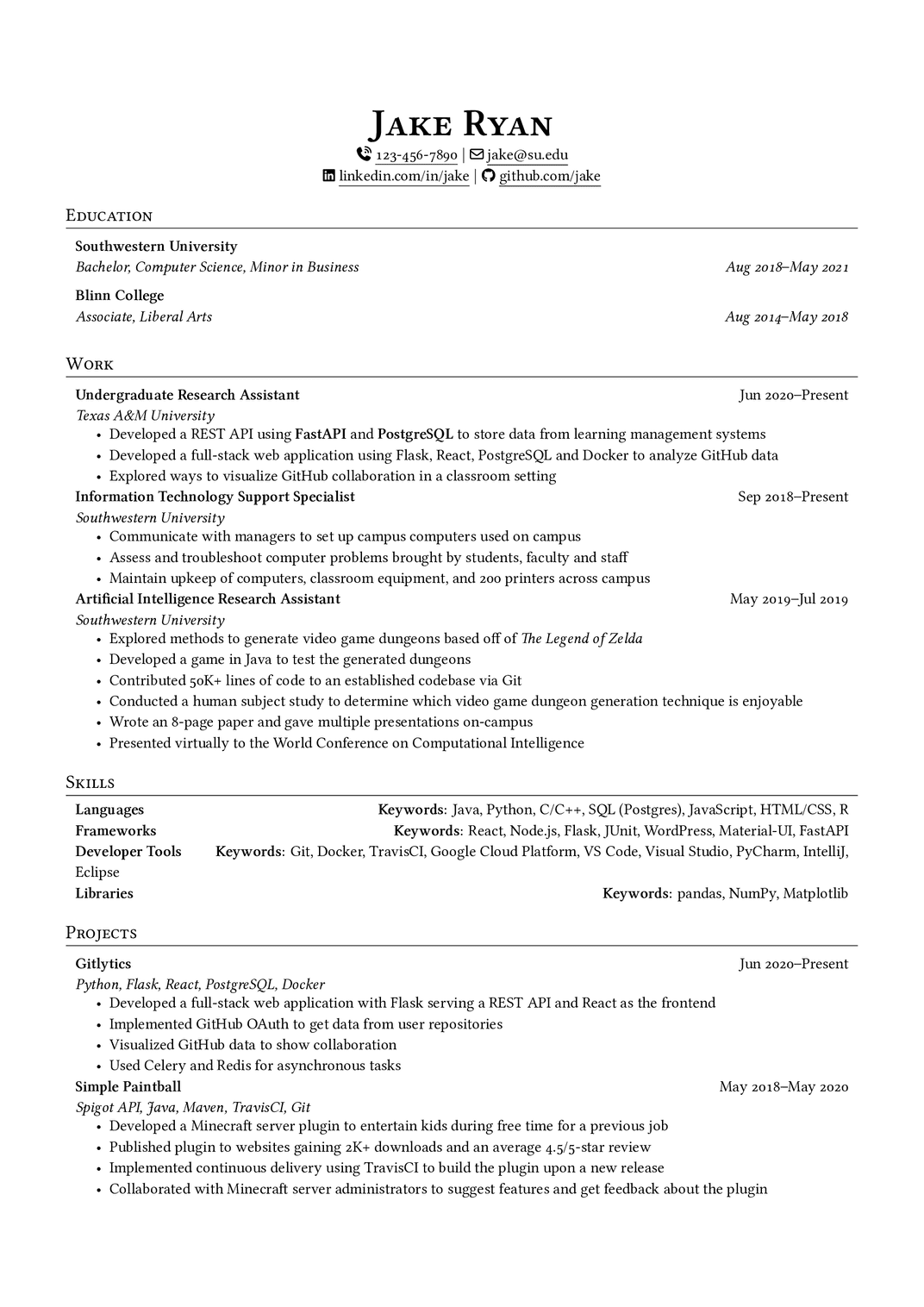
Você obtém a aparência característica do Jake's Resume — o nome centralizado,
a linha de contato separada por $|$, os títulos de seção com linha
horizontal, os intervalos de datas alinhados — sem escrever uma única linha
de LaTeX. Você também pode conferir um exemplo ao vivo em nossa galeria de
modelos e ler a documentação do
modelo.
Para comparação, aqui está o código-fonte LaTeX completo que o YAMLResume gera a partir do YAML acima. Você nunca escreve nem edita este arquivo manualmente — ele é regenerado a partir do seu YAML a cada build:
Jake's Resume gerado pelo YAMLResume — código-fonte LaTeX completo (185 linhas)
\documentclass[a4paper,10pt]{article}

\usepackage{changepage}
\usepackage[usenames,dvipsnames]{color}
\usepackage{enumitem}
\IfFileExists{fontawesome7.sty}{%
  \usepackage{fontawesome7}%
}{%
  \usepackage{fontawesome5}%
}
\usepackage[hidelinks]{hyperref}
\usepackage{titlesec}

%% page layout/margins
\usepackage[top=2.5cm, bottom=2.5cm, left=1.5cm, right=1.5cm]{geometry}

% Disable page numbers
\pagenumbering{gobble}

%% Babel config for English language
\usepackage[english]{babel}

%% fontspec
\usepackage{fontspec}

\IfFontExistsTF{Linux Libertine}{
  \setmainfont[Ligatures={TeX, Common}, Numbers=OldStyle]{Linux Libertine}
}{}
\IfFontExistsTF{Linux Libertine O}{
  \setmainfont[Ligatures={TeX, Common}, Numbers=OldStyle]{Linux Libertine O}
}{}

%% CTeX
% CJK support, used to show CJK characters in the resume
%
% - fontset=none: disable builtin fontset but instead set the CJK font manually
% - heading=false: disable ctex heading
% - punct=kaiming: use kaiming punctuations styles for CJK
% - scheme=plain: use plain scheme, do not override \normalsize font size
% - space=auto: space settings for CJK characters
%
% ref:
% - http://ctan.mirrorcatalogs.com/language/chinese/ctex/ctex.pdf
\usepackage[UTF8, heading=false, punct=kaiming, scheme=plain, space=auto]{ctex}

\IfFontExistsTF{Noto Serif CJK SC}{
  \setCJKmainfont{Noto Serif CJK SC}
}{}
\IfFontExistsTF{Noto Sans CJK SC}{
  \setCJKsansfont{Noto Sans CJK SC}
}{}

%% line spacing
\usepackage{setspace}
\setstretch{1.125}

%% URL styling - use normal text instead of monospace
\urlstyle{same}

% Auto-underline all links
% Defer until \begin{document} so hyperref is already loaded
\AtBeginDocument{%
  \let\oldhref\href
  \renewcommand{\href}[2]{\oldhref{#1}{\underline{#2}}}%
}

%% PDF metadata
\hypersetup{
  pdfauthor={Jake Ryan},
  pdftitle={Jake Ryan},
  pdfkeywords={Languages, Frameworks, Developer Tools, Libraries},
  pdfsubject={Résumé of Jake Ryan},
  pdfcreator={YAMLResume (https://yamlresume.dev)},
}

% global itemize spacing
\setlist[itemize]{nosep}
\setlength{\parindent}{0pt}

% Sections formatting
\titleformat{\section}{
  \vspace{-4pt}\scshape\raggedright\large
}{}{0em}{}[\color{black}\titlerule \vspace{-5pt}]

% Custom commands
\newcommand{\resumeSubheading}[4]{
  \begin{tabular*}{\textwidth}[t]{l@{\extracolsep{\fill}}r}
    \textbf{#1} & #2 \\
    \textit{#3} & \textit{#4} \\
  \end{tabular*}
}


\begin{document}

\begin{center}
\textbf{\Huge \scshape Jake Ryan}\vspace{2pt}

{\Large }

{\small \faPhoneVolume}~\href{tel:123-456-7890}{123-456-7890} $|$ {\small \faEnvelope[regular]}~\href{mailto:jake@su.edu}{jake@su.edu}


{\small \faLinkedin}\ \href{https://linkedin.com/in/jake}{linkedin.com/in/jake} $|$ {\small \faGithub}\ \href{https://github.com/jake}{github.com/jake}
\end{center}

\section{Education}
\resumeSubheading
{Southwestern University}{}
{Bachelor, Computer Science, Minor in Business}{Aug 2018–May 2021}

\resumeSubheading
{Blinn College}{}
{Associate, Liberal Arts}{Aug 2014–May 2018}
\section{Work}
\resumeSubheading
{Undergraduate Research Assistant}{Jun 2020–Present}
{Texas A\&M University}{}
\begin{adjustwidth}{6pt}{6pt}
\begin{itemize}
\item Developed a REST API using \textbf{FastAPI} and \textbf{PostgreSQL} to store data from learning management systems
\item Developed a full-stack web application using Flask, React, PostgreSQL and Docker to analyze GitHub data
\item Explored ways to visualize GitHub collaboration in a classroom setting
\end{itemize}
\end{adjustwidth}

\resumeSubheading
{Information Technology Support Specialist}{Sep 2018–Present}
{Southwestern University}{}
\begin{adjustwidth}{6pt}{6pt}
\begin{itemize}
\item Communicate with managers to set up campus computers used on campus
\item Assess and troubleshoot computer problems brought by students, faculty and staff
\item Maintain upkeep of computers, classroom equipment, and 200 printers across campus
\end{itemize}
\end{adjustwidth}

\resumeSubheading
{Artificial Intelligence Research Assistant}{May 2019–Jul 2019}
{Southwestern University}{}
\begin{adjustwidth}{6pt}{6pt}
\begin{itemize}
\item Explored methods to generate video game dungeons based off of \textit{The Legend of Zelda}
\item Developed a game in Java to test the generated dungeons
\item Contributed 50K+ lines of code to an established codebase via Git
\item Conducted a human subject study to determine which video game dungeon generation technique is enjoyable
\item Wrote an 8-page paper and gave multiple presentations on-campus
\item Presented virtually to the World Conference on Computational Intelligence
\end{itemize}
\end{adjustwidth}
\section{Skills}
\begin{adjustwidth}{6pt}{6pt}
\textbf{Languages} \hfill \textbf{Keywords}: Java, Python, C/C++, SQL (Postgres), JavaScript, HTML/CSS, R

\textbf{Frameworks} \hfill \textbf{Keywords}: React, Node.js, Flask, JUnit, WordPress, Material-UI, FastAPI

\textbf{Developer Tools} \hfill \textbf{Keywords}: Git, Docker, TravisCI, Google Cloud Platform, VS Code, Visual Studio, PyCharm, IntelliJ, Eclipse

\textbf{Libraries} \hfill \textbf{Keywords}: pandas, NumPy, Matplotlib
\end{adjustwidth}
\section{Projects}
\resumeSubheading
{Gitlytics}{Jun 2020–Present}
{Python, Flask, React, PostgreSQL, Docker}{}
\begin{adjustwidth}{6pt}{6pt}
\begin{itemize}
\item Developed a full-stack web application with Flask serving a REST API and React as the frontend
\item Implemented GitHub OAuth to get data from user repositories
\item Visualized GitHub data to show collaboration
\item Used Celery and Redis for asynchronous tasks
\end{itemize}
\end{adjustwidth}

\resumeSubheading
{Simple Paintball}{May 2018–May 2020}
{Spigot API, Java, Maven, TravisCI, Git}{}
\begin{adjustwidth}{6pt}{6pt}
\begin{itemize}
\item Developed a Minecraft server plugin to entertain kids during free time for a previous job
\item Published plugin to websites gaining 2K+ downloads and an average 4.5/5-star review
\item Implemented continuous delivery using TravisCI to build the plugin upon a new release
\item Collaborated with Minecraft server administrators to suggest features and get feedback about the plugin
\end{itemize}
\end{adjustwidth}
\end{document}
O que mantivemos
Preservamos deliberadamente o DNA de design que faz do Jake's Resume o Jake's Resume. Na verdade, depois de adaptar o modelo à arquitetura do YAMLResume, apenas duas partes do preâmbulo original sobreviveram:
% Sections formatting
\titleformat{\section}{
  \vspace{-4pt}\scshape\raggedright\large
}{}{0em}{}[\color{black}\titlerule \vspace{-5pt}]

% Custom commands
\newcommand{\resumeSubheading}[4]{
  \begin{tabular*}{\textwidth}[t]{l@{\extracolsep{\fill}}r}
    \textbf{#1} & #2 \\
    \textit{#3} & \textit{#4} \\
  \end{tabular*}
}\titleformat— o título de seção em versalete com uma linha horizontal\resumeSubheading— o cabeçalho de entrada em duas linhas com datas alinhadas à direita, usado para trabalho, formação, projetos e todas as outras seções com datas
Junto com o cabeçalho centralizado, o separador de contato $|$ e as
listas itemize compactas com nosep, esses elementos carregam toda a
identidade visual do modelo. Todo o resto — cerca de uma dúzia de pacotes e
uma página de macros — foi substituído pelo pipeline de renderização
compartilhado do YAMLResume.
O que melhoramos
Manter a aparência foi a parte fácil. O valor real está em tudo o que o YAMLResume adiciona ao redor dela.
Conteúdo, finalmente separado da apresentação
No modelo original, seu currículo é código LaTeX. No YAMLResume, seu currículo é dado. Trocar de modelo é uma mudança de uma linha:
layouts:
  - engine: latex
    template: jake                  # or moderncv-banking, moderncv-casual, ...
E como layouts é uma lista, um único arquivo YAML pode produzir um PDF no
estilo Jake's Resume, uma página HTML pronta para a
web e uma cópia em Markdown para formulários de
candidatura em texto simples — tudo em um único yamlresume build.
Dados estruturados com validação por esquema
Cada campo é definido em um JSON Schema público.
Com a diretiva yaml-language-server no topo do arquivo, seu editor oferece
preenchimento automático, documentação inline e validação enquanto você
digita. Graus, níveis de fluência em idiomas, níveis de habilidade e redes de
perfis são enums — erros de digitação são detectados antes mesmo de você
compilar, não depois de um log de erro LaTeX de 40 linhas.
Chega de escape manual
O modelo original obriga você a escrever Texas A\&M University. No
YAMLResume, você escreve Texas A&M University — o escape para LaTeX é
aplicado automaticamente no momento da renderização, em todos os lugares, de
forma consistente.
Datas estruturadas e localizadas
Datas são dados (startDate: Aug 2018), não strings embutidas em macros. O
YAMLResume as formata de forma consistente em todo o documento, e um
endDate vazio é renderizado como "Present" — traduzido para o idioma do seu
currículo.
Internacionalização de verdade
O modelo original é fixo em inglês. O YAMLResume oferece suporte a 12
idiomas regionais — inglês, chinês (simplificado,
tradicional de Hong Kong, tradicional de Taiwan), espanhol, francês,
norueguês, holandês, japonês, alemão, indonésio e português brasileiro.
Títulos de seções, graus, níveis de fluência e formatos de data são
traduzidos automaticamente, com configuração de babel por idioma e
composição tipográfica CJK adequada via ctex e fontes Noto.
Resumos em Markdown
Cada campo summary aceita um subconjunto prático de markdown — negrito,
itálico, listas e links — que é convertido em
LaTeX correto. No modelo original, você escreve \textbf{} e ambientes
itemize manualmente, inline.
Controles de tipografia e layout
O que exige editar o preâmbulo no original aqui é uma opção de configuração:
layouts:
  - engine: latex
    template: jake
    page:
      paperSize: a4            # a4 | letter
      showPageNumbers: true
      margins:
        top: 2.5cm
        bottom: 2.5cm
        left: 1.5cm
        right: 1.5cm
    typography:
      fontSize: 11pt           # 10pt | 11pt | 12pt
      lineSpacing: relaxed     # tight | snug | normal | relaxed | loose
      fontFamily: Linux Libertine O
    advanced:
      showIcons: true
      showUrls: true
As margens são tratadas pelo pacote geometry em vez dos truques de margem
negativa com \addtolength do original, e as fontes são resolvidas com
fallbacks de \IfFontExistsTF em vez da roleta de comentar/descomentar.
Aliases e reordenação de seções
Renomeie qualquer título de seção ou mude a ordem das seções sem tocar em LaTeX — por exemplo, coloque Projetos antes de Trabalho, ou renomeie "Work" para "Experience":
layouts:
  - engine: latex
    template: jake
    sections:
      aliases:
        work: Experience
      order:
        - projects
        - work
Consulte aliases de seção e reordenação de seções para mais detalhes.
Links modernos, ícones e metadados de PDF
A linha de contato do cabeçalho ganha links clicáveis tel: e mailto:,
\hrefs sublinhados com bordas de link ocultas e ícones FontAwesome
opcionais (com fallback automático de fontawesome7 para fontawesome5). O
PDF gerado também carrega metadados adequados — autor, título e palavras-chave
derivadas de suas habilidades — que o modelo original nunca define.
Testado e mantido
O renderizador Jake vem com mais de 700 linhas de testes unitários cobrindo o
preâmbulo, cada seção e cada opção de layout, e é construído sobre a mesma
base compartilhada LatexRenderer dos nossos modelos moderncv — portanto,
melhorias no pipeline chegam ao Jake's Resume automaticamente.
Resumo
| Jake's Resume original | YAMLResume template: jake | |
|---|---|---|
| Formato de autoria | LaTeX puro | YAML estruturado |
| Validação | Erros de compilação LaTeX | JSON Schema + preenchimento na IDE |
| Caracteres especiais | Escape manual | Automático |
| Datas | Strings digitadas à mão | Estruturadas, localizadas |
| Idiomas | Somente inglês | 12 idiomas regionais, pronto para CJK |
| Texto rico | Macros LaTeX inline | Resumos em Markdown |
| Modelos | Um arquivo, um design | Uma linha para trocar |
| Formatos de saída | Somente PDF | PDF, HTML, Markdown |
| Personalização de layout | Editar o preâmbulo | Opções de configuração |
| Renomear/reordenar seções | Reescrever macros | Opções de configuração |
Experimente hoje
$ npm install -g yamlresume
$ yamlresume new resume.yml
# edit resume.yml, set `template: jake`
$ yamlresume build resume.yml
Ou abra o playground e mude o modelo para jake para vê-lo
ao vivo no seu navegador.
Créditos
Todo o crédito pelo design original vai para Jake Gutierrez e sb2nov, que lançaram seus modelos sob a licença MIT e presentearam a comunidade com um clássico moderno. Nossa adaptação foi acompanhada nas issues #88 e #179, e lançada no YAMLResume v0.12.
Como sempre, seus comentários e contribuições são bem-vindos no GitHub. Boas criações!
Written by
Xiao HanyuAt
Sat Oct 03 2026