Jake's Resume は、史上最も人気のある LaTeX 履歴書テンプレートのひとつです。Jake Gutierrez が sb2nov's resume をベースに作成したこのテンプレートは、GitHub で 2,800 以上のスターを獲得し、クリーンで 1 カラム、ATS フレンドリーなデザインによって履歴書コミュニティでの定番の推奨テンプレートとなっています。
YAMLResume は v0.12 で Jake's Resume を公式 LaTeX テンプレートとして採用しました。この記事では、YAMLResume 上で Jake's Resume がどのように見えるか、そして——より重要なことに——オリジナルのテンプレートに対して YAMLResume が何を改善したかを紹介します。
オリジナルの Jake's Resume
オリジナルのテンプレートは、1 つの resume.tex ファイルです。コンテンツを 1 語書く前に、パッケージ、余白調整のハック、セクションの書式設定、そして \resumeSubheading、\resumeItem、\resumeProjectHeading といった一連のカスタムマクロを含む約 100 行のプリアンブルを読み進めることになります。
コンテンツは LaTeX で直接記述します。
\section{Education}
  \resumeSubHeadingListStart
    \resumeSubheading
      {Southwestern University}{Georgetown, TX}
      {Bachelor of Arts in Computer Science, Minor in Business}{Aug. 2018 -- May 2021}
  \resumeSubHeadingListEnd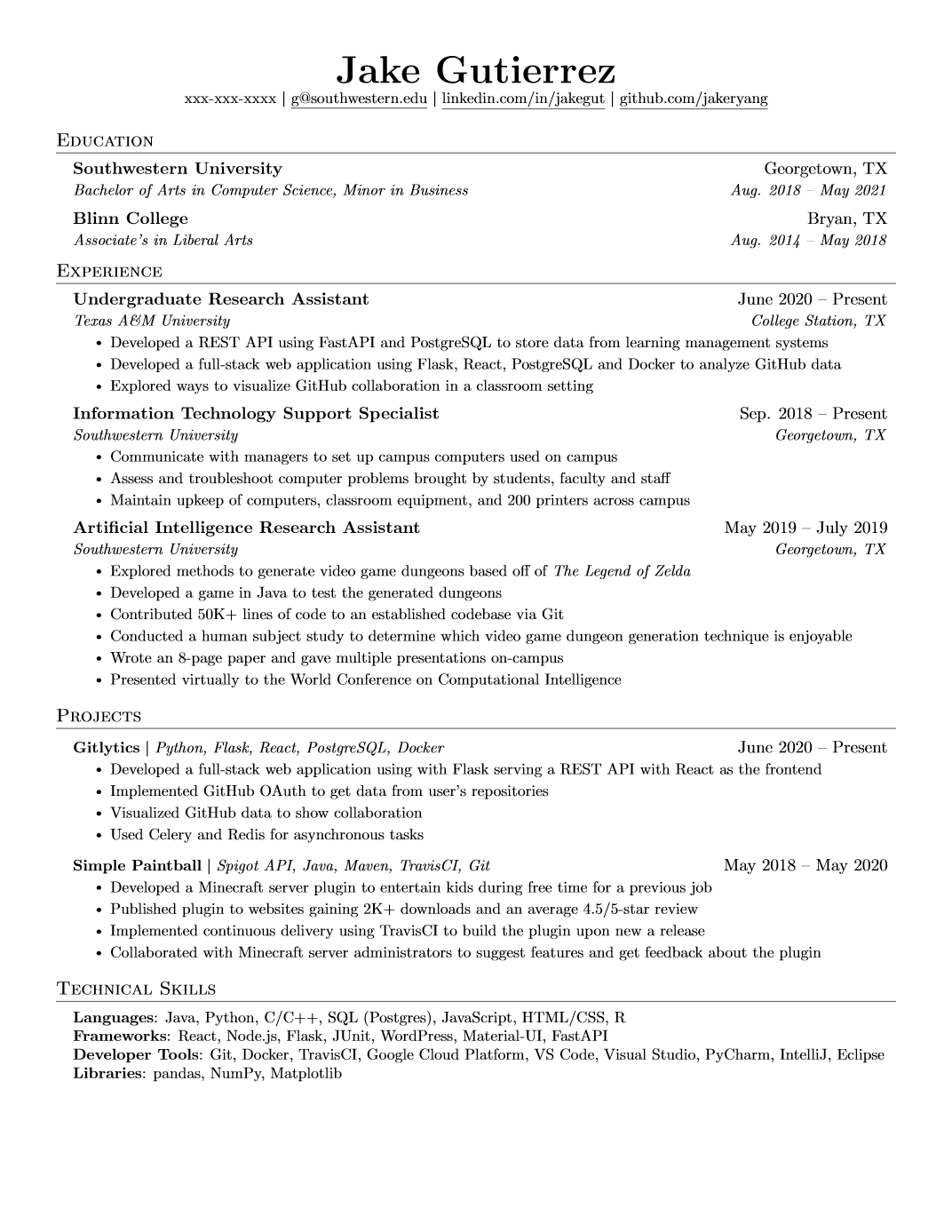
出来上がりは美しいのですが、執筆体験は純粋な LaTeX です。すべての日付範囲を手入力し、すべての特殊文字をエスケープし(Texas A\&M University)、LaTeX の悪名高い不可解なエラーログを読みながら括弧の不一致をデバッグします。別のフォントに変えたい?\usepackage の行をコメントアウトしたり戻したりします。第二言語がほしい?ファイルを書き直すしかありません。
興味のある方のために、218 行の resume.tex ソース全文を掲載します。
オリジナルの Jake's Resume — LaTeX ソース全文(218 行)
%-------------------------
% Resume in Latex
% Author : Jake Gutierrez
% Based off of: https://github.com/sb2nov/resume
% License : MIT
%------------------------

\documentclass[letterpaper,11pt]{article}

\usepackage{latexsym}
\usepackage[empty]{fullpage}
\usepackage{titlesec}
\usepackage{marvosym}
\usepackage[usenames,dvipsnames]{color}
\usepackage{verbatim}
\usepackage{enumitem}
\usepackage[hidelinks]{hyperref}
\usepackage{fancyhdr}
\usepackage[english]{babel}
\usepackage{tabularx}
\input{glyphtounicode}


%----------FONT OPTIONS----------
% sans-serif
% \usepackage[sfdefault]{FiraSans}
% \usepackage[sfdefault]{roboto}
% \usepackage[sfdefault]{noto-sans}
% \usepackage[default]{sourcesanspro}

% serif
% \usepackage{CormorantGaramond}
% \usepackage{charter}


\pagestyle{fancy}
\fancyhf{} % clear all header and footer fields
\fancyfoot{}
\renewcommand{\headrulewidth}{0pt}
\renewcommand{\footrulewidth}{0pt}

% Adjust margins
\addtolength{\oddsidemargin}{-0.5in}
\addtolength{\evensidemargin}{-0.5in}
\addtolength{\textwidth}{1in}
\addtolength{\topmargin}{-.5in}
\addtolength{\textheight}{1.0in}

\urlstyle{same}

\raggedbottom
\raggedright
\setlength{\tabcolsep}{0in}

% Sections formatting
\titleformat{\section}{
  \vspace{-4pt}\scshape\raggedright\large
}{}{0em}{}[\color{black}\titlerule \vspace{-5pt}]

% Ensure that generate pdf is machine readable/ATS parsable
\pdfgentounicode=1

%-------------------------
% Custom commands
\newcommand{\resumeItem}[1]{
  \item\small{
    {#1 \vspace{-2pt}}
  }
}

\newcommand{\resumeSubheading}[4]{
  \vspace{-2pt}\item
    \begin{tabular*}{0.97\textwidth}[t]{l@{\extracolsep{\fill}}r}
      \textbf{#1} & #2 \\
      \textit{\small#3} & \textit{\small #4} \\
    \end{tabular*}\vspace{-7pt}
}

\newcommand{\resumeSubSubheading}[2]{
    \item
    \begin{tabular*}{0.97\textwidth}{l@{\extracolsep{\fill}}r}
      \textit{\small#1} & \textit{\small #2} \\
    \end{tabular*}\vspace{-7pt}
}

\newcommand{\resumeProjectHeading}[2]{
    \item
    \begin{tabular*}{0.97\textwidth}{l@{\extracolsep{\fill}}r}
      \small#1 & #2 \\
    \end{tabular*}\vspace{-7pt}
}

\newcommand{\resumeSubItem}[1]{\resumeItem{#1}\vspace{-4pt}}

\renewcommand\labelitemii{$\vcenter{\hbox{\tiny$\bullet$}}$}

\newcommand{\resumeSubHeadingListStart}{\begin{itemize}[leftmargin=0.15in, label={}]}
\newcommand{\resumeSubHeadingListEnd}{\end{itemize}}
\newcommand{\resumeItemListStart}{\begin{itemize}}
\newcommand{\resumeItemListEnd}{\end{itemize}\vspace{-5pt}}

%-------------------------------------------
%%%%%%  RESUME STARTS HERE  %%%%%%%%%%%%%%%%%%%%%%%%%%%%


\begin{document}

%----------HEADING----------
% \begin{tabular*}{\textwidth}{l@{\extracolsep{\fill}}r}
%   \textbf{\href{http://sourabhbajaj.com/}{\Large Sourabh Bajaj}} & Email : \href{mailto:sourabh@sourabhbajaj.com}{sourabh@sourabhbajaj.com}\\
%   \href{http://sourabhbajaj.com/}{http://www.sourabhbajaj.com} & Mobile : +1-123-456-7890 \\
% \end{tabular*}

\begin{center}
    \textbf{\Huge \scshape Jake Ryan} \\ \vspace{1pt}
    \small 123-456-7890 $|$ \href{mailto:x@x.com}{\underline{jake@su.edu}} $|$
    \href{https://linkedin.com/in/...}{\underline{linkedin.com/in/jake}} $|$
    \href{https://github.com/...}{\underline{github.com/jake}}
\end{center}


%-----------EDUCATION-----------
\section{Education}
  \resumeSubHeadingListStart
    \resumeSubheading
      {Southwestern University}{Georgetown, TX}
      {Bachelor of Arts in Computer Science, Minor in Business}{Aug. 2018 -- May 2021}
    \resumeSubheading
      {Blinn College}{Bryan, TX}
      {Associate's in Liberal Arts}{Aug. 2014 -- May 2018}
  \resumeSubHeadingListEnd


%-----------EXPERIENCE-----------
\section{Experience}
  \resumeSubHeadingListStart

    \resumeSubheading
      {Undergraduate Research Assistant}{June 2020 -- Present}
      {Texas A\&M University}{College Station, TX}
      \resumeItemListStart
        \resumeItem{Developed a REST API using FastAPI and PostgreSQL to store data from learning management systems}
        \resumeItem{Developed a full-stack web application using Flask, React, PostgreSQL and Docker to analyze GitHub data}
        \resumeItem{Explored ways to visualize GitHub collaboration in a classroom setting}
      \resumeItemListEnd

% -----------Multiple Positions Heading-----------
%    \resumeSubSubheading
%     {Software Engineer I}{Oct 2014 - Sep 2016}
%     \resumeItemListStart
%        \resumeItem{Apache Beam}
%          {Apache Beam is a unified model for defining both batch and streaming data-parallel processing pipelines}
%     \resumeItemListEnd
%    \resumeSubHeadingListEnd
%-------------------------------------------

    \resumeSubheading
      {Information Technology Support Specialist}{Sep. 2018 -- Present}
      {Southwestern University}{Georgetown, TX}
      \resumeItemListStart
        \resumeItem{Communicate with managers to set up campus computers used on campus}
        \resumeItem{Assess and troubleshoot computer problems brought by students, faculty and staff}
        \resumeItem{Maintain upkeep of computers, classroom equipment, and 200 printers across campus}
    \resumeItemListEnd

    \resumeSubheading
      {Artificial Intelligence Research Assistant}{May 2019 -- July 2019}
      {Southwestern University}{Georgetown, TX}
      \resumeItemListStart
        \resumeItem{Explored methods to generate video game dungeons based off of \emph{The Legend of Zelda}}
        \resumeItem{Developed a game in Java to test the generated dungeons}
        \resumeItem{Contributed 50K+ lines of code to an established codebase via Git}
        \resumeItem{Conducted  a human subject study to determine which video game dungeon generation technique is enjoyable}
        \resumeItem{Wrote an 8-page paper and gave multiple presentations on-campus}
        \resumeItem{Presented virtually to the World Conference on Computational Intelligence}
      \resumeItemListEnd

  \resumeSubHeadingListEnd


%-----------PROJECTS-----------
\section{Projects}
    \resumeSubHeadingListStart
      \resumeProjectHeading
          {\textbf{Gitlytics} $|$ \emph{Python, Flask, React, PostgreSQL, Docker}}{June 2020 -- Present}
          \resumeItemListStart
            \resumeItem{Developed a full-stack web application using with Flask serving a REST API with React as the frontend}
            \resumeItem{Implemented GitHub OAuth to get data from user’s repositories}
            \resumeItem{Visualized GitHub data to show collaboration}
            \resumeItem{Used Celery and Redis for asynchronous tasks}
          \resumeItemListEnd
      \resumeProjectHeading
          {\textbf{Simple Paintball} $|$ \emph{Spigot API, Java, Maven, TravisCI, Git}}{May 2018 -- May 2020}
          \resumeItemListStart
            \resumeItem{Developed a Minecraft server plugin to entertain kids during free time for a previous job}
            \resumeItem{Published plugin to websites gaining 2K+ downloads and an average 4.5/5-star review}
            \resumeItem{Implemented continuous delivery using TravisCI to build the plugin upon new a release}
            \resumeItem{Collaborated with Minecraft server administrators to suggest features and get feedback about the plugin}
          \resumeItemListEnd
    \resumeSubHeadingListEnd


%
%-----------PROGRAMMING SKILLS-----------
\section{Technical Skills}
 \begin{itemize}[leftmargin=0.15in, label={}]
    \small{\item{
     \textbf{Languages}{: Java, Python, C/C++, SQL (Postgres), JavaScript, HTML/CSS, R} \\
     \textbf{Frameworks}{: React, Node.js, Flask, JUnit, WordPress, Material-UI, FastAPI} \\
     \textbf{Developer Tools}{: Git, Docker, TravisCI, Google Cloud Platform, VS Code, Visual Studio, PyCharm, IntelliJ, Eclipse} \\
     \textbf{Libraries}{: pandas, NumPy, Matplotlib}
    }}
 \end{itemize}


%-------------------------------------------
\end{document}
YAMLResume での Jake's Resume
YAMLResume では、同じ履歴書が純粋で構造化された YAML になります。Jake Ryan の履歴書を書き直したものがこちらです。
# yaml-language-server: $schema=https://yamlresume.dev/schema.json

---
content:
  basics:
    name: Jake Ryan
    phone: 123-456-7890
    email: jake@su.edu
  profiles:
    - network: LinkedIn
      url: https://linkedin.com/in/jake
      username: linkedin.com/in/jake
    - network: GitHub
      url: https://github.com/jake
      username: github.com/jake
  education:
    - institution: Southwestern University
      degree: Bachelor
      area: Computer Science, Minor in Business
      startDate: Aug 2018
      endDate: May 2021
    - institution: Blinn College
      degree: Associate
      area: Liberal Arts
      startDate: Aug 2014
      endDate: May 2018
  work:
    - name: Texas A&M University
      position: Undergraduate Research Assistant
      startDate: Jun 2020
      summary: |
        - Developed a REST API using **FastAPI** and **PostgreSQL** to store data from learning management systems
        - Developed a full-stack web application using Flask, React, PostgreSQL and Docker to analyze GitHub data
        - Explored ways to visualize GitHub collaboration in a classroom setting
    - name: Southwestern University
      position: Information Technology Support Specialist
      startDate: Sep 2018
      summary: |
        - Communicate with managers to set up campus computers used on campus
        - Assess and troubleshoot computer problems brought by students, faculty and staff
        - Maintain upkeep of computers, classroom equipment, and 200 printers across campus
    - name: Southwestern University
      position: Artificial Intelligence Research Assistant
      startDate: May 2019
      endDate: Jul 2019
      summary: |
        - Explored methods to generate video game dungeons based off of *The Legend of Zelda*
        - Developed a game in Java to test the generated dungeons
        - Contributed 50K+ lines of code to an established codebase via Git
        - Conducted a human subject study to determine which video game dungeon generation technique is enjoyable
        - Wrote an 8-page paper and gave multiple presentations on-campus
        - Presented virtually to the World Conference on Computational Intelligence
  projects:
    - name: Gitlytics
      description: Python, Flask, React, PostgreSQL, Docker
      startDate: Jun 2020
      summary: |
        - Developed a full-stack web application with Flask serving a REST API and React as the frontend
        - Implemented GitHub OAuth to get data from user repositories
        - Visualized GitHub data to show collaboration
        - Used Celery and Redis for asynchronous tasks
    - name: Simple Paintball
      description: Spigot API, Java, Maven, TravisCI, Git
      startDate: May 2018
      endDate: May 2020
      summary: |
        - Developed a Minecraft server plugin to entertain kids during free time for a previous job
        - Published plugin to websites gaining 2K+ downloads and an average 4.5/5-star review
        - Implemented continuous delivery using TravisCI to build the plugin upon a new release
        - Collaborated with Minecraft server administrators to suggest features and get feedback about the plugin
  skills:
    - name: Languages
      keywords: [Java, Python, C/C++, SQL (Postgres), JavaScript, HTML/CSS, R]
    - name: Frameworks
      keywords: [React, Node.js, Flask, JUnit, WordPress, Material-UI, FastAPI]
    - name: Developer Tools
      keywords: [Git, Docker, TravisCI, Google Cloud Platform, VS Code, Visual Studio, PyCharm, IntelliJ, Eclipse]
    - name: Libraries
      keywords: [pandas, NumPy, Matplotlib]

locale:
  language: en

layouts:
  - engine: latex
    template: jake
あとはビルドするだけです。
$ yamlresume build resume.yml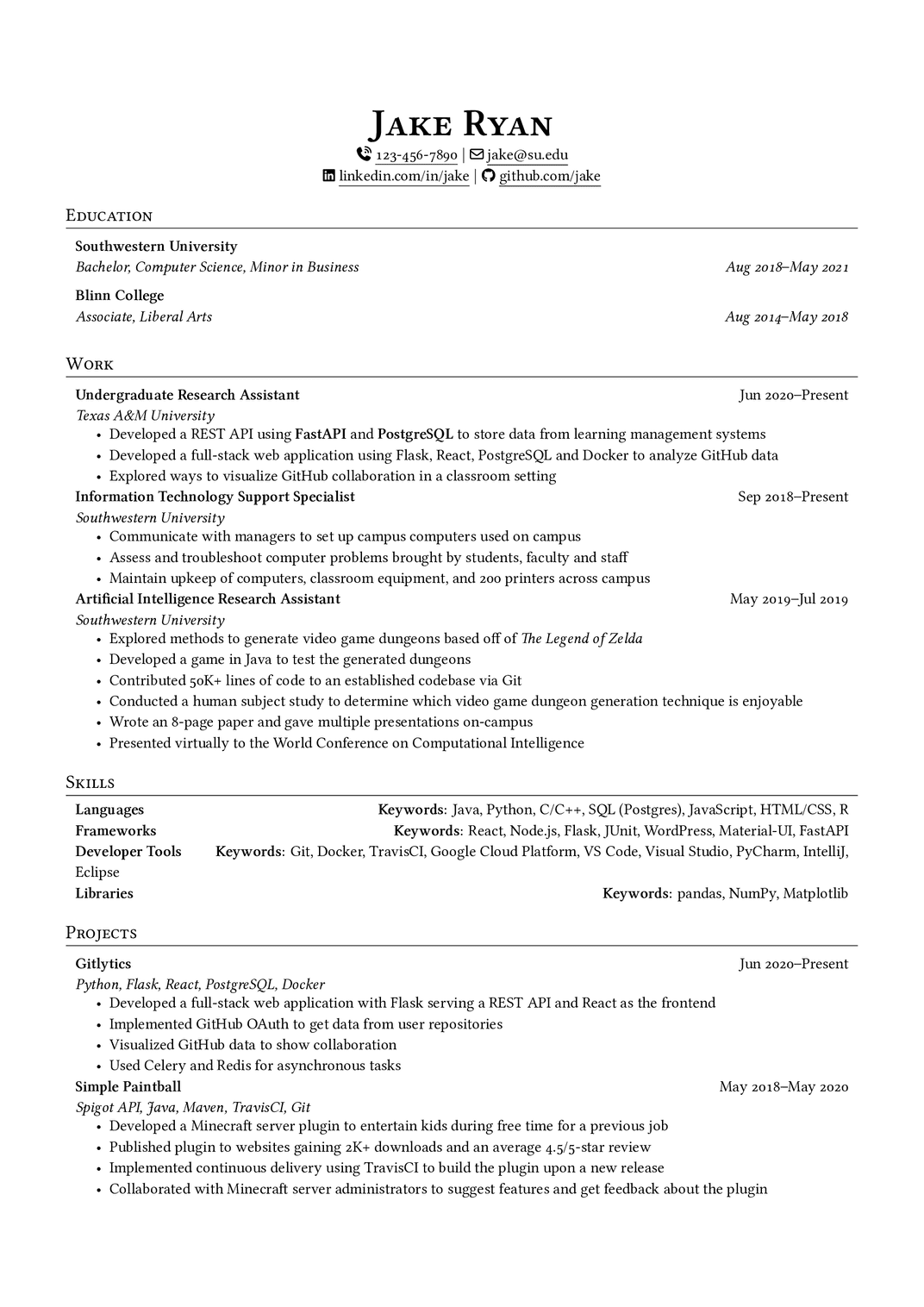
中央揃えの名前、$|$ で区切られた連絡先行、罫線付きのセクション見出し、右揃えの日付範囲——Jake's Resume の象徴的な見た目を、LaTeX を 1 行も書くことなく得られます。テンプレートギャラリーで実際の例を閲覧したり、テンプレートのドキュメントを読んだりすることもできます。
比較のために、YAMLResume が上記の YAML から生成する完全な LaTeX ソースを掲載します。このファイルを手で書いたり編集したりすることはありません——ビルドのたびに YAML から再生成されます。
YAMLResume が生成した Jake's Resume — LaTeX ソース全文(185 行)
\documentclass[a4paper,10pt]{article}

\usepackage{changepage}
\usepackage[usenames,dvipsnames]{color}
\usepackage{enumitem}
\IfFileExists{fontawesome7.sty}{%
  \usepackage{fontawesome7}%
}{%
  \usepackage{fontawesome5}%
}
\usepackage[hidelinks]{hyperref}
\usepackage{titlesec}

%% page layout/margins
\usepackage[top=2.5cm, bottom=2.5cm, left=1.5cm, right=1.5cm]{geometry}

% Disable page numbers
\pagenumbering{gobble}

%% Babel config for English language
\usepackage[english]{babel}

%% fontspec
\usepackage{fontspec}

\IfFontExistsTF{Linux Libertine}{
  \setmainfont[Ligatures={TeX, Common}, Numbers=OldStyle]{Linux Libertine}
}{}
\IfFontExistsTF{Linux Libertine O}{
  \setmainfont[Ligatures={TeX, Common}, Numbers=OldStyle]{Linux Libertine O}
}{}

%% CTeX
% CJK support, used to show CJK characters in the resume
%
% - fontset=none: disable builtin fontset but instead set the CJK font manually
% - heading=false: disable ctex heading
% - punct=kaiming: use kaiming punctuations styles for CJK
% - scheme=plain: use plain scheme, do not override \normalsize font size
% - space=auto: space settings for CJK characters
%
% ref:
% - http://ctan.mirrorcatalogs.com/language/chinese/ctex/ctex.pdf
\usepackage[UTF8, heading=false, punct=kaiming, scheme=plain, space=auto]{ctex}

\IfFontExistsTF{Noto Serif CJK SC}{
  \setCJKmainfont{Noto Serif CJK SC}
}{}
\IfFontExistsTF{Noto Sans CJK SC}{
  \setCJKsansfont{Noto Sans CJK SC}
}{}

%% line spacing
\usepackage{setspace}
\setstretch{1.125}

%% URL styling - use normal text instead of monospace
\urlstyle{same}

% Auto-underline all links
% Defer until \begin{document} so hyperref is already loaded
\AtBeginDocument{%
  \let\oldhref\href
  \renewcommand{\href}[2]{\oldhref{#1}{\underline{#2}}}%
}

%% PDF metadata
\hypersetup{
  pdfauthor={Jake Ryan},
  pdftitle={Jake Ryan},
  pdfkeywords={Languages, Frameworks, Developer Tools, Libraries},
  pdfsubject={Résumé of Jake Ryan},
  pdfcreator={YAMLResume (https://yamlresume.dev)},
}

% global itemize spacing
\setlist[itemize]{nosep}
\setlength{\parindent}{0pt}

% Sections formatting
\titleformat{\section}{
  \vspace{-4pt}\scshape\raggedright\large
}{}{0em}{}[\color{black}\titlerule \vspace{-5pt}]

% Custom commands
\newcommand{\resumeSubheading}[4]{
  \begin{tabular*}{\textwidth}[t]{l@{\extracolsep{\fill}}r}
    \textbf{#1} & #2 \\
    \textit{#3} & \textit{#4} \\
  \end{tabular*}
}


\begin{document}

\begin{center}
\textbf{\Huge \scshape Jake Ryan}\vspace{2pt}

{\Large }

{\small \faPhoneVolume}~\href{tel:123-456-7890}{123-456-7890} $|$ {\small \faEnvelope[regular]}~\href{mailto:jake@su.edu}{jake@su.edu}


{\small \faLinkedin}\ \href{https://linkedin.com/in/jake}{linkedin.com/in/jake} $|$ {\small \faGithub}\ \href{https://github.com/jake}{github.com/jake}
\end{center}

\section{Education}
\resumeSubheading
{Southwestern University}{}
{Bachelor, Computer Science, Minor in Business}{Aug 2018–May 2021}

\resumeSubheading
{Blinn College}{}
{Associate, Liberal Arts}{Aug 2014–May 2018}
\section{Work}
\resumeSubheading
{Undergraduate Research Assistant}{Jun 2020–Present}
{Texas A\&M University}{}
\begin{adjustwidth}{6pt}{6pt}
\begin{itemize}
\item Developed a REST API using \textbf{FastAPI} and \textbf{PostgreSQL} to store data from learning management systems
\item Developed a full-stack web application using Flask, React, PostgreSQL and Docker to analyze GitHub data
\item Explored ways to visualize GitHub collaboration in a classroom setting
\end{itemize}
\end{adjustwidth}

\resumeSubheading
{Information Technology Support Specialist}{Sep 2018–Present}
{Southwestern University}{}
\begin{adjustwidth}{6pt}{6pt}
\begin{itemize}
\item Communicate with managers to set up campus computers used on campus
\item Assess and troubleshoot computer problems brought by students, faculty and staff
\item Maintain upkeep of computers, classroom equipment, and 200 printers across campus
\end{itemize}
\end{adjustwidth}

\resumeSubheading
{Artificial Intelligence Research Assistant}{May 2019–Jul 2019}
{Southwestern University}{}
\begin{adjustwidth}{6pt}{6pt}
\begin{itemize}
\item Explored methods to generate video game dungeons based off of \textit{The Legend of Zelda}
\item Developed a game in Java to test the generated dungeons
\item Contributed 50K+ lines of code to an established codebase via Git
\item Conducted a human subject study to determine which video game dungeon generation technique is enjoyable
\item Wrote an 8-page paper and gave multiple presentations on-campus
\item Presented virtually to the World Conference on Computational Intelligence
\end{itemize}
\end{adjustwidth}
\section{Skills}
\begin{adjustwidth}{6pt}{6pt}
\textbf{Languages} \hfill \textbf{Keywords}: Java, Python, C/C++, SQL (Postgres), JavaScript, HTML/CSS, R

\textbf{Frameworks} \hfill \textbf{Keywords}: React, Node.js, Flask, JUnit, WordPress, Material-UI, FastAPI

\textbf{Developer Tools} \hfill \textbf{Keywords}: Git, Docker, TravisCI, Google Cloud Platform, VS Code, Visual Studio, PyCharm, IntelliJ, Eclipse

\textbf{Libraries} \hfill \textbf{Keywords}: pandas, NumPy, Matplotlib
\end{adjustwidth}
\section{Projects}
\resumeSubheading
{Gitlytics}{Jun 2020–Present}
{Python, Flask, React, PostgreSQL, Docker}{}
\begin{adjustwidth}{6pt}{6pt}
\begin{itemize}
\item Developed a full-stack web application with Flask serving a REST API and React as the frontend
\item Implemented GitHub OAuth to get data from user repositories
\item Visualized GitHub data to show collaboration
\item Used Celery and Redis for asynchronous tasks
\end{itemize}
\end{adjustwidth}

\resumeSubheading
{Simple Paintball}{May 2018–May 2020}
{Spigot API, Java, Maven, TravisCI, Git}{}
\begin{adjustwidth}{6pt}{6pt}
\begin{itemize}
\item Developed a Minecraft server plugin to entertain kids during free time for a previous job
\item Published plugin to websites gaining 2K+ downloads and an average 4.5/5-star review
\item Implemented continuous delivery using TravisCI to build the plugin upon a new release
\item Collaborated with Minecraft server administrators to suggest features and get feedback about the plugin
\end{itemize}
\end{adjustwidth}
\end{document}
残したもの
Jake's Resume を Jake's Resume たらしめているデザインの DNA は、意図的にそのまま残しました。実際、テンプレートを YAMLResume のアーキテクチャに適合させた結果、オリジナルのプリアンブルから生き残ったのは 2 つのパーツだけです。
% Sections formatting
\titleformat{\section}{
  \vspace{-4pt}\scshape\raggedright\large
}{}{0em}{}[\color{black}\titlerule \vspace{-5pt}]

% Custom commands
\newcommand{\resumeSubheading}[4]{
  \begin{tabular*}{\textwidth}[t]{l@{\extracolsep{\fill}}r}
    \textbf{#1} & #2 \\
    \textit{#3} & \textit{#4} \\
  \end{tabular*}
}\titleformat— 水平罫線付きのスモールキャップのセクション見出し\resumeSubheading— 日付を右揃えにした 2 行のエントリーヘッダー。職歴、学歴、プロジェクト、その他すべての日付付きセクションで使用されます
中央揃えのヘッダー、$|$ の連絡先セパレーター、コンパクトな nosep の箇条書きリストと合わせて、これらがテンプレートの視覚的アイデンティティ全体を担っています。それ以外のもの——約 12 のパッケージと 1 ページ分のマクロ——はすべて、YAMLResume の共通レンダリングパイプラインに置き換えられました。
改善したもの
見た目を維持するのは簡単な部分でした。本当の価値は、YAMLResume がその周囲に追加するすべてのものにあります。
コンテンツとプレゼンテーションの分離
オリジナルのテンプレートでは、履歴書そのものが LaTeX コードです。YAMLResume では、履歴書はデータです。テンプレートの切り替えは 1 行の変更で済みます。
layouts:
  - engine: latex
    template: jake                  # or moderncv-banking, moderncv-casual, ...
また layouts はリストなので、1 つの YAML ファイルから Jake's Resume の PDF、Web 向けの HTML ページ、プレーンテキストの応募フォーム用の Markdown コピーまで、すべて 1 回の yamlresume build で生成できます。
スキーマ検証付きの構造化データ
すべてのフィールドは公開された JSON Schema で定義されています。ファイル先頭の yaml-language-server ディレクティブにより、エディターが入力補完、インラインドキュメント、リアルタイムの検証を提供します。学位、言語の流暢さ、スキルレベル、プロフィールのネットワークは列挙型です——タイポは 40 行に及ぶ LaTeX のエラーログの後ではなく、コンパイル前に検出されます。
手動エスケープはもう不要
オリジナルのテンプレートでは Texas A\&M University と書く必要がありました。YAMLResume では Texas A&M University と書くだけです——LaTeX のエスケープはレンダリング時に、あらゆる場所で一貫して自動的に適用されます。
構造化されたローカライズ済みの日付
日付はマクロに埋め込まれた文字列ではなく、データ(startDate: Aug 2018)です。YAMLResume はドキュメント全体で一貫した書式に整え、空の endDate は「Present」としてレンダリングされます——履歴書の言語に翻訳された形で。
本物の国際化
オリジナルのテンプレートは英語に固定されています。YAMLResume は 12 のロケール言語——英語、中国語(簡体字、繁体字香港、繁体字台湾)、スペイン語、フランス語、ノルウェー語、オランダ語、日本語、ドイツ語、インドネシア語、ブラジルポルトガル語——をサポートしています。セクションタイトル、学位、流暢さレベル、日付フォーマットは自動的に翻訳され、言語ごとの babel 設定と、ctex および Noto フォントによる適切な CJK 組版が行われます。
Markdown サマリー
すべての summary フィールドは、実用的な markdown のサブセット——太字、斜体、リスト、リンク——を受け付け、正しい LaTeX に変換されます。オリジナルのテンプレートでは \textbf{} や itemize 環境をインラインで手書きしていました。
タイポグラフィとレイアウトの制御
オリジナルではプリアンブルの編集が必要だったことが、ここでは設定オプションになっています。
layouts:
  - engine: latex
    template: jake
    page:
      paperSize: a4            # a4 | letter
      showPageNumbers: true
      margins:
        top: 2.5cm
        bottom: 2.5cm
        left: 1.5cm
        right: 1.5cm
    typography:
      fontSize: 11pt           # 10pt | 11pt | 12pt
      lineSpacing: relaxed     # tight | snug | normal | relaxed | loose
      fontFamily: Linux Libertine O
    advanced:
      showIcons: true
      showUrls: true
余白はオリジナルの負のマージンによる \addtolength ハックではなく geometry パッケージで処理され、フォントはコメントアウトの切り替えではなく \IfFontExistsTF によるフォールバックで解決されます。
セクションのエイリアスと並べ替え
LaTeX に触れることなく、セクションタイトルの変更やセクションの並べ替えができます——たとえば Projects を Work の前に置いたり、「Work」を「Experience」に改名したり。
layouts:
  - engine: latex
    template: jake
    sections:
      aliases:
        work: Experience
      order:
        - projects
- work詳しくはセクションのエイリアスとセクションの並べ替えをご覧ください。
モダンなリンク、アイコン、PDF メタデータ
ヘッダーの連絡先行には、クリック可能な tel: および mailto: リンク、リンク枠を隠した下線付きの \href、オプションの FontAwesome アイコン(fontawesome7 → fontawesome5 への自動フォールバック付き)が付きます。生成される PDF には適切なメタデータ——著者、タイトル、スキルから導出されたキーワード——も含まれます。オリジナルのテンプレートにはこれらが一切設定されていません。
テスト済みでメンテナンスされている
Jake レンダラーには、プリアンブル、すべてのセクション、すべてのレイアウトオプションをカバーする 700 行を超えるユニットテストが付属しており、moderncv テンプレートと同じ共通の LatexRenderer ベースの上に構築されています——そのため、パイプラインへの改善は自動的に Jake's Resume にも反映されます。
一目でわかる比較
| オリジナルの Jake's Resume | YAMLResume template: jake | |
|---|---|---|
| 執筆フォーマット | 生の LaTeX | 構造化 YAML |
| 検証 | LaTeX のコンパイルエラー | JSON Schema + IDE の入力補完 |
| 特殊文字 | 手動エスケープ | 自動 |
| 日付 | 手入力の文字列 | 構造化・ローカライズ済み |
| 言語 | 英語のみ | 12 のロケール言語、CJK 対応 |
| リッチテキスト | インラインの LaTeX マクロ | Markdown サマリー |
| テンプレート | 1 ファイル = 1 デザイン | 切り替えは 1 行 |
| 出力フォーマット | PDF のみ | PDF、HTML、Markdown |
| レイアウトのカスタマイズ | プリアンブルを編集 | 設定オプション |
| セクション名の変更・並べ替え | マクロを書き直す | 設定オプション |
今すぐ試す
$ npm install -g yamlresume
$ yamlresume new resume.yml
# edit resume.yml, set `template: jake`
$ yamlresume build resume.ymlあるいはプレイグラウンドを開いてテンプレートを jake に切り替えれば、ブラウザー上で実際の動作を確認できます。
クレジット
オリジナルデザインのすべての功績は Jake Gutierrez と sb2nov に帰属します。彼らはテンプレートを MIT ライセンスで公開し、コミュニティに現代のクラシックを贈ってくれました。私たちの適応作業は issue #88 と #179 で追跡され、YAMLResume v0.12 でリリースされました。
いつも通り、皆さんからのフィードバックやコントリビューションを GitHub でお待ちしています。楽しいビルドを!
Written by
Xiao HanyuAt
Sat Oct 03 2026