Mulai Cepat
Pendahuluan
Membuat resume mungkin tidak sulit, tetapi pasti adalah proses yang membosankan, panjang, dan melelahkan.
Dengan YAMLResume, Anda dapat membuat dan mengontrol versi resume Anda dengan YAML dan membuat PDF sempurna piksel dengan tata letak dan typesetting profesional dengan mudah.
YAMLResume adalah mesin inti dari PPResume, builder berbasis LaTeX. Ini telah membantu ribuan orang di seluruh dunia membuat resume sempurna piksel dan profesional serta mendapatkan pekerjaan impian mereka. Di sini kami memutuskan untuk open source mesin ini, untuk memberikan orang hak dan kebebasan untuk mengatakan tidak pada vendor lock-in
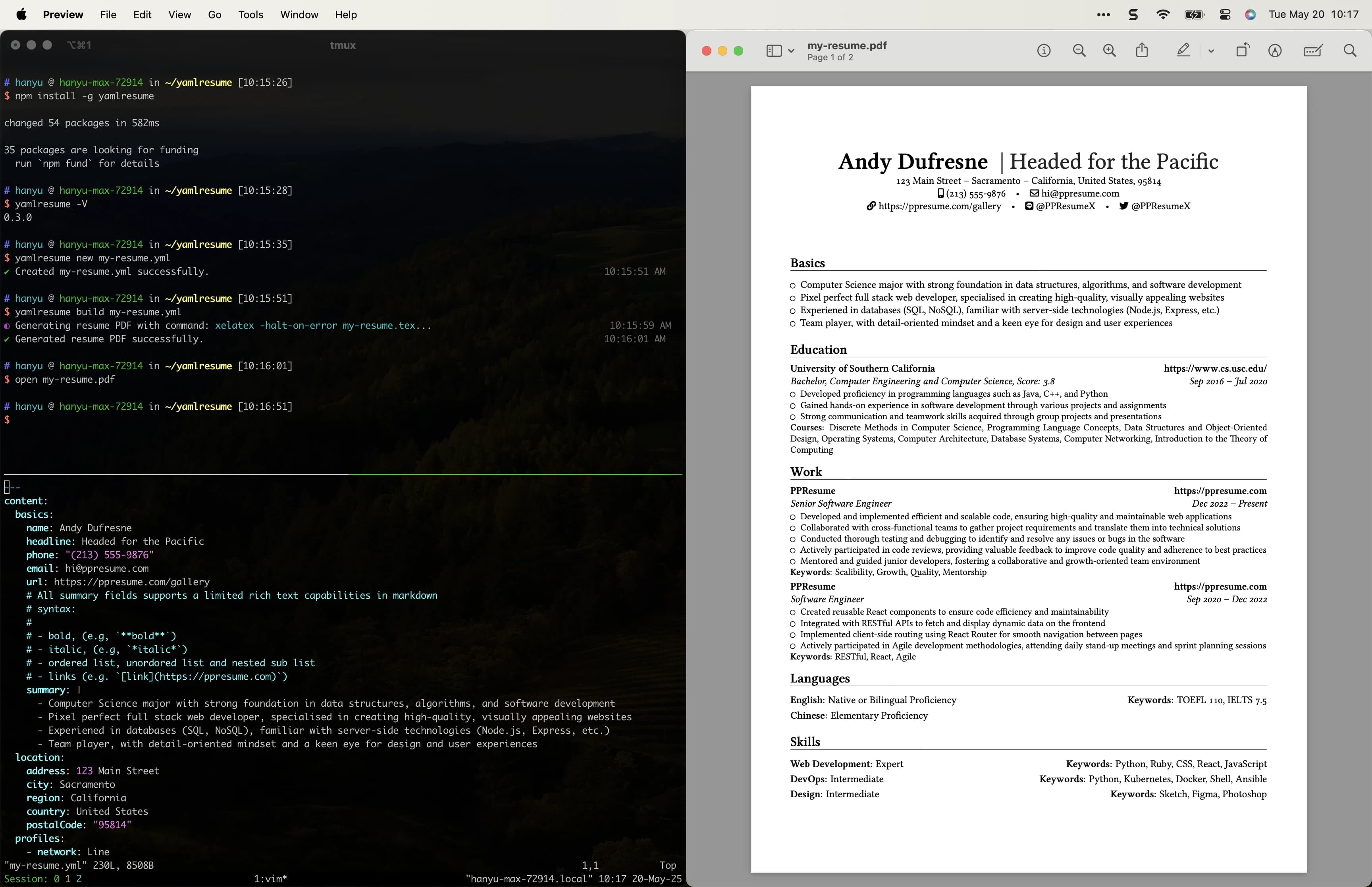
Memulai
Pengguna Docker
Jika Anda pengguna docker, Anda beruntung, kami memiliki image docker untuk Anda, yang memiliki yamlresume cli terinstal dengan semua dependensinya, seperti XeTeX dan beberapa font yang direkomendasikan.
Anda dapat membuat resume baru dengan perintah berikut:
docker run --rm -v $(pwd):/home/yamlresume yamlresume/yamlresume new my-resume.ymlEdit my-resume.yml sesuai kebutuhan lalu build resume dari yaml ke pdf:
docker run --rm -v $(pwd):/home/yamlresume yamlresume/yamlresume build my-resume.ymlPengguna macOS
Mari kita asumsikan Anda menggunakan macOS dengan Homebrew sebagai manajer paket. Jika tidak, silakan lihat panduan Instalasi untuk instruksi detail untuk sistem operasi Anda.
Instal Mesin Typesetting
YAMLResume membutuhkan mesin typesetting untuk menghasilkan PDF. Saat ini mendukung dua mesin typesetting:
brew install mactexbrew install tectonicInstal YAMLResume
Menginstal yamlresume sangat mudah. Anda dapat menginstalnya menggunakan manajer paket Node.js favorit Anda:
npm install -g yamlresumepnpm add -g yamlresumeyarn global add yamlresumebun add -g yamlresumeAnda juga dapat menginstal yamlresume melalui
Homebrew:
brew install yamlresumeVerifikasi yamlresume berhasil terinstal:
$ yamlresume help
Usage: yamlresume [options] [command]

YAMLResume — Resume as Code in YAML

 __   __ _    __  __ _     ____
 \ \ / // \  |  \/  | |   |  _ \ ___  ___ _   _ ___  ___   ___
  \ V // _ \ | |\/| | |   | |_) / _ \/ __| | | / _ \/ _ \ / _ \
   | |/ ___ \| |  | | |___|  _ <  __/\__ \ |_| | | | | | |  __/
   |_/_/   \_\_|  |_|_____|_| \_\___||___/\____|_| |_| |_|\___|


Options:
  -V, --version                  output the version number
  -v, --verbose                  verbose output
  -h, --help                     display help for command

Commands:
  ai                             AI-powered resume generation
  build [options] <resume-path>  build a resume to Docx, HTML, Markdown or
                                 LaTeX/PDF
  dev [options] <resume-path>    build a resume on file changes (watch mode)
  doctor                         check environment for YAMLResume dependencies
  languages                      i18n and l10n support
  new [filename]                 create a new resume
  templates                      manage resume templates
  validate <resume-path>         validate a resume against the YAMLResume schema
  help [command]                 display help for command
[Opsional] Instal Font
Font Linux Libertine
Kami juga merekomendasikan menginstal font Linux Libertine untuk tampilan PDF terbaik, tetapi ini opsional.
brew install font-linux-libertineFont Noto
Jika Anda perlu membuat resume CJK (China, Jepang, Korea), kami merekomendasikan untuk menginstal font Noto:
brew install font-noto-sans-cjk font-noto-serif-cjkBuat Resume YAML Pertama Anda
OK, semuanya sudah siap, sekarang kita bisa membuat resume yaml dengan yamlresume new:
$ yamlresume new my-resume.yml
✔ Created my-resume.yml successfully.
Edit resume.yml sesuai kebutuhan, lalu Anda dapat menghasilkan PDF dengan yamlresume build:
$ yamlresume build my-resume.yml
◐ Generating resume PDF file with command: xelatex -halt-on-error my-resume.tex...
✔ Generated resumep PDF file successfully.
Anda juga dapat menggunakan yamlresume dev untuk build resume saat file berubah:
$ yamlresume dev my-resume.yml
◐ Generating resume PDF file with command: xelatex -halt-on-error my-resume.tex...
✔ Generated resume PDF file successfully.
◐ Watching file changes: my-resume.yml...
Contoh Resume
Berikut adalah kode lengkap untuk contoh resume dua halaman, disesuaikan untuk insinyur perangkat lunak:
---
content:
  basics:
    name: Andy Dufresne
    headline: Headed for the Pacific
    phone: "(213) 555-9876"
    email: hi@ppresume.com
    url: https://ppresume.com/gallery
    # All summary fields supports a limited rich text capabilities in markdown
    # syntax:
    #
    # - bold, (e.g, `**bold**`)
    # - italic, (e.g, `*italic*`)
    # - ordered list, unordored list and nested sub list
    # - links (e.g. `[link](https://ppresume.com)`)
    summary: |
      - Computer Science major with strong foundation in data structures, algorithms, and software development
      - Pixel perfect full stack web developer, specialised in creating high-quality, visually appealing websites
      - Experiened in databases (SQL, NoSQL), familiar with server-side technologies (Node.js, Express, etc.)
      - Team player, with detail-oriented mindset and a keen eye for design and user experiences
  location:
    address: 123 Main Street
    city: Sacramento
    region: California
    country: United States
    postalCode: "95814"
  profiles:
    - network: Line
      url: https://line.com/PPResumeX
      username: PPResumeX
    - network: Twitter
      url: https://twitter.com/PPResumeX
      username: PPResumeX
  education:
    - institution: University of Southern California
      url: https://www.cs.usc.edu/
      # Valid degree options:
      #
      # - 'Middle School'
      # - 'High School'
      # - 'Diploma'
      # - 'Associate'
      # - 'Bachelor'
      # - 'Master'
      # - 'Doctor'
      degree: Bachelor
      area: Computer Engineering and Computer Science
      score: "3.8"
      # Should be a valid date string that can be parsed by `new Date(dateStr)`
      # in JavaScript, eg. '2020-01', '2020-02-03', 'Jul 1, 2023' etc.
      #
      # The date part would be removed in the final output as most of the time
      # people won't really care about the exact date for your working
      # experience or education background, etc.
      # ref: https://developer.mozilla.org/en-US/docs/Web/JavaScript/Reference/Global_Objects/Date/Date
      startDate: Sep 1, 2016
      # Leave endDate blank to indicate "Present"
      endDate: Jul 1, 2020
      courses:
        - Discrete Methods in Computer Science
        - Programming Language Concepts
        - Data Structures and Object-Oriented Design
        - Operating Systems
        - Computer Architecture
        - Database Systems
        - Computer Networking
        - Introduction to the Theory of Computing
      summary: |
        - Developed proficiency in programming languages such as Java, C++, and Python
        - Gained hands-on experience in software development through various projects and assignments
        - Strong communication and teamwork skills acquired through group projects and presentations
  work:
    - name: PPResume
      url: https://ppresume.com
      startDate: Dec 1, 2022
      endDate: ""
      position: Senior Software Engineer
      summary: |
        - Developed and implemented efficient and scalable code, ensuring high-quality and maintainable web applications
        - Collaborated with cross-functional teams to gather project requirements and translate them into technical solutions
        - Conducted thorough testing and debugging to identify and resolve any issues or bugs in the software
        - Actively participated in code reviews, providing valuable feedback to improve code quality and adherence to best practices
        - Mentored and guided junior developers, fostering a collaborative and growth-oriented team environment
      keywords:
        - Scalibility
        - Growth
        - Quality
        - Mentorship
    - name: PPResume
      url: https://ppresume.com
      startDate: Sep 1, 2020
      endDate: Dec 1, 2022
      position: Software Engineer
      summary: |
        - Created reusable React components to ensure code efficiency and maintainability
        - Integrated with RESTful APIs to fetch and display dynamic data on the frontend
        - Implemented client-side routing using React Router for smooth navigation between pages
        - Actively participated in Agile development methodologies, attending daily stand-up meetings and sprint planning sessions
      keywords:
        - RESTful
        - React
        - Agile
  languages:
    # Valid language fluency options:
    #
    # - 'Elementary Proficiency'
    # - 'Limited Working Proficiency'
    # - 'Minimum Professional Proficiency'
    # - 'Full Professional Proficiency'
    # - 'Native or Bilingual Proficiency'
    - language: English
      fluency: Native or Bilingual Proficiency
      keywords:
        - TOEFL 110
        - IELTS 7.5
    - language: Chinese
      fluency: Elementary Proficiency
      keywords: []
  skills:
    # Valid skill level options:
    #
    # - 'Novice'
    # - 'Beginner'
    # - 'Intermediate'
    # - 'Advanced'
    # - 'Expert'
    # - 'Master'
    - name: Web Development
      level: Expert
      keywords:
        - Python
        - Ruby
        - CSS
        - React
        - JavaScript
    - name: DevOps
      level: Intermediate
      keywords:
        - Python
        - Kubernetes
        - Docker
        - Shell
        - Ansible
    - name: Design
      level: Intermediate
      keywords:
        - Sketch
        - Figma
        - Photoshop
  awards:
    - title: Dean's List
      awarder: University of Southern California
      date: Oct 2016
      summary: |
        Awarded to students who achieve a high academic standing by maintaining a specified grade point average (GPA) during a semester.
  certificates:
    - name: AWS Certified Developer - Associate
      url: https://aws.amazon.com/certification/
      issuer: AWS
      date: Mar 2021
  publications:
    - publisher: ACM Transactions on Interactive Intelligent Systems
      url: https://dl.acm.org/journal/tiis
      name: Enhancing Human-Computer Interaction through Augmented Reality
      releaseDate: Dec 2017
      summary: |
        - Explores the potential of augmented reality (AR) in improving interaction between humans and computers
        - Highlights benefits of AR in various areas such as gaming, education, healthcare, and design
        - Discusses challenges and future directions of AR technology in enhancing user experience
  references:
    - name: Dr. Amanda Reynolds
      phone: "(555) 123-4567"
      relationship: Computer Science Professor
      email: amanda.reynolds@usc.edu
      summary: |
        Andy Dufresne shows exceptional problem-solving skills and a solid understanding of programming concepts, he would bring immense value to any team or organization he becomes a part of.
  projects:
    - name: EduWeb
      url: https://www.eduweb.xyz/
      description: A web-based educational platform for interactive learning
      startDate: Sep 2016
      endDate: Dec 2016
      summary: |
        - Designed to enhance online learning experiences
        - Facilitates students' engagement and collaboration through interactive features and user-friendly interface
        - Offers a wide range of courses across various subjects
        - Aims to improve the way students learn through the power of the web
      keywords:
        - Education
        - Online Learning
        - HCI
  interests:
    - name: Sports
      keywords:
        - Soccer
        - Swimming
        - Bicycling
        - Hiking
    - name: Music
      keywords:
        - Piano
        - Guitar
  volunteer:
    - organization: USC Computer Science and Engineering Society
      url: https://www.usccsesociety.org/
      position: Tech Mentor
      startDate: Sep 2015
      endDate: Jul 2023
      summary: |
        - Volunteered as a Tech Mentor at USC Computer Science and Engineering Society
        - Provided guidance and assistance to fellow students in their technical projects and coursework
        - Assisted in organizing workshops, coding competitions, and networking events for the society members
        - Contributed to fostering a collaborative and supportive environment within the student community

locale:
  # Use `yamlresume languages list` to get the list of supported languages
  language: en

layouts:
  - engine: latex
    page:
      margins:
        top: 2.5cm
        left: 1.5cm
        right: 1.5cm
        bottom: 2.5cm
      showPageNumbers: true
    # Use `yamlresume templates list` to get the list of available templates
    template: moderncv-banking
    typography:
      # LaTeX engine only supports 10pt, 11pt, and 12pt
      fontSize: 11pt
  - engine: markdown
  - engine: html
    # Use `yamlresume templates list` to get the list of available templates
    template: calm
    typography:
      # HTML engine only supports font size in px unit, from 14px to 20px
      fontSize: 16px
Berikut adalah tangkapan layar dari PDF yang dihasilkan:
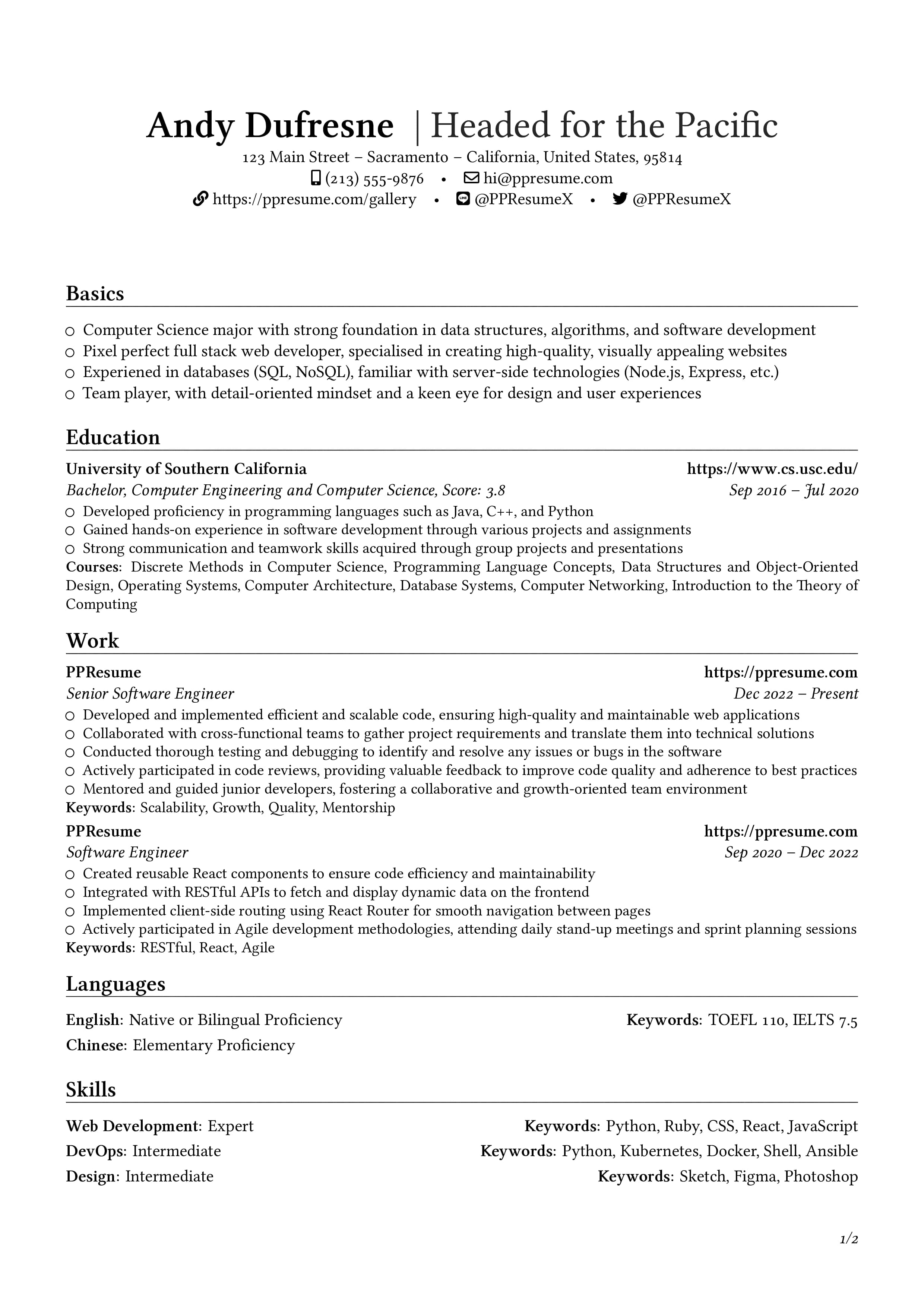
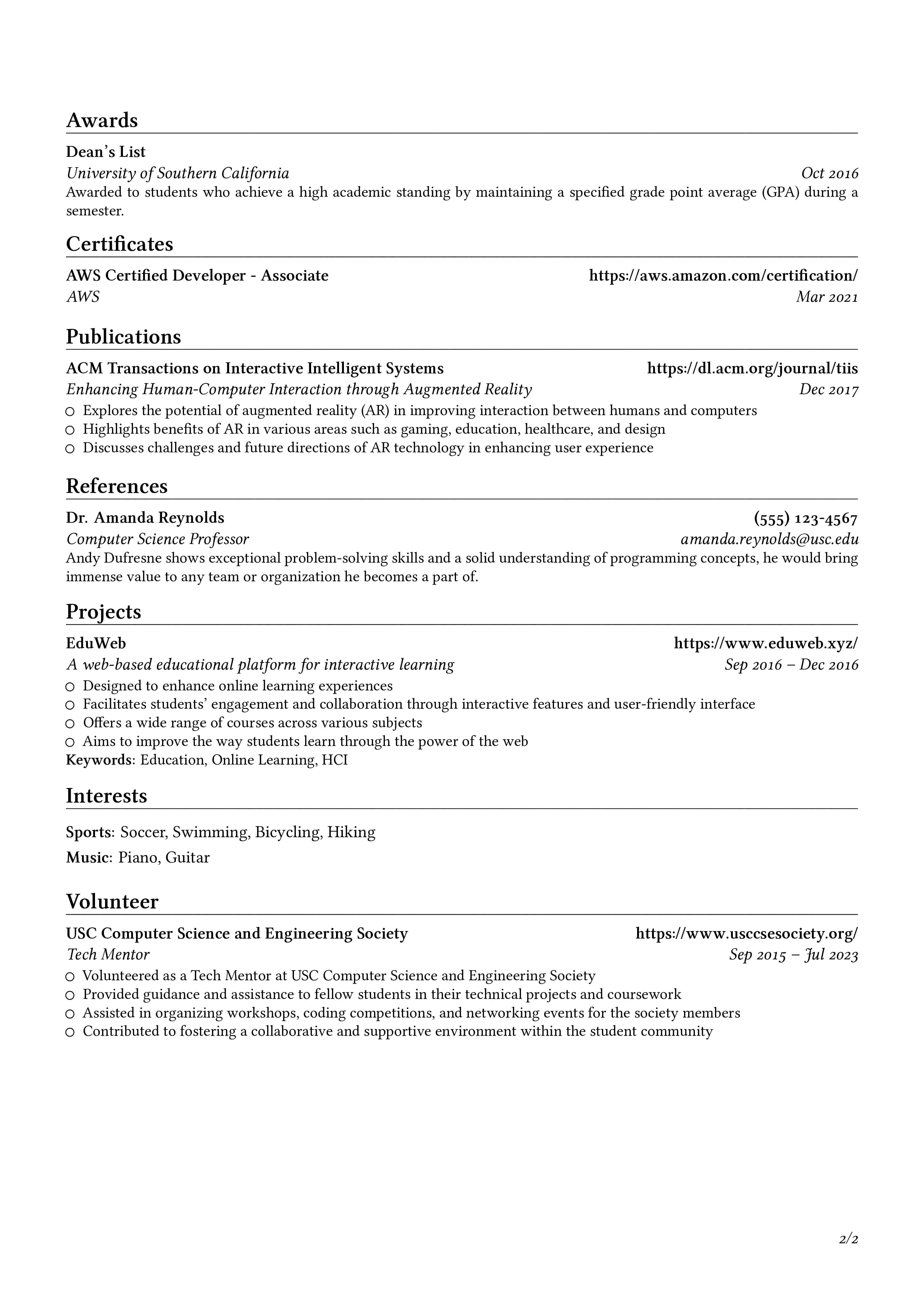
Anda dapat melihat PPResume Gallery untuk lebih banyak contoh, dengan dukungan untuk berbagai template dan multi-bahasa.
Pelajari Lebih Lanjut
Last updated on