VS Code
Implementation
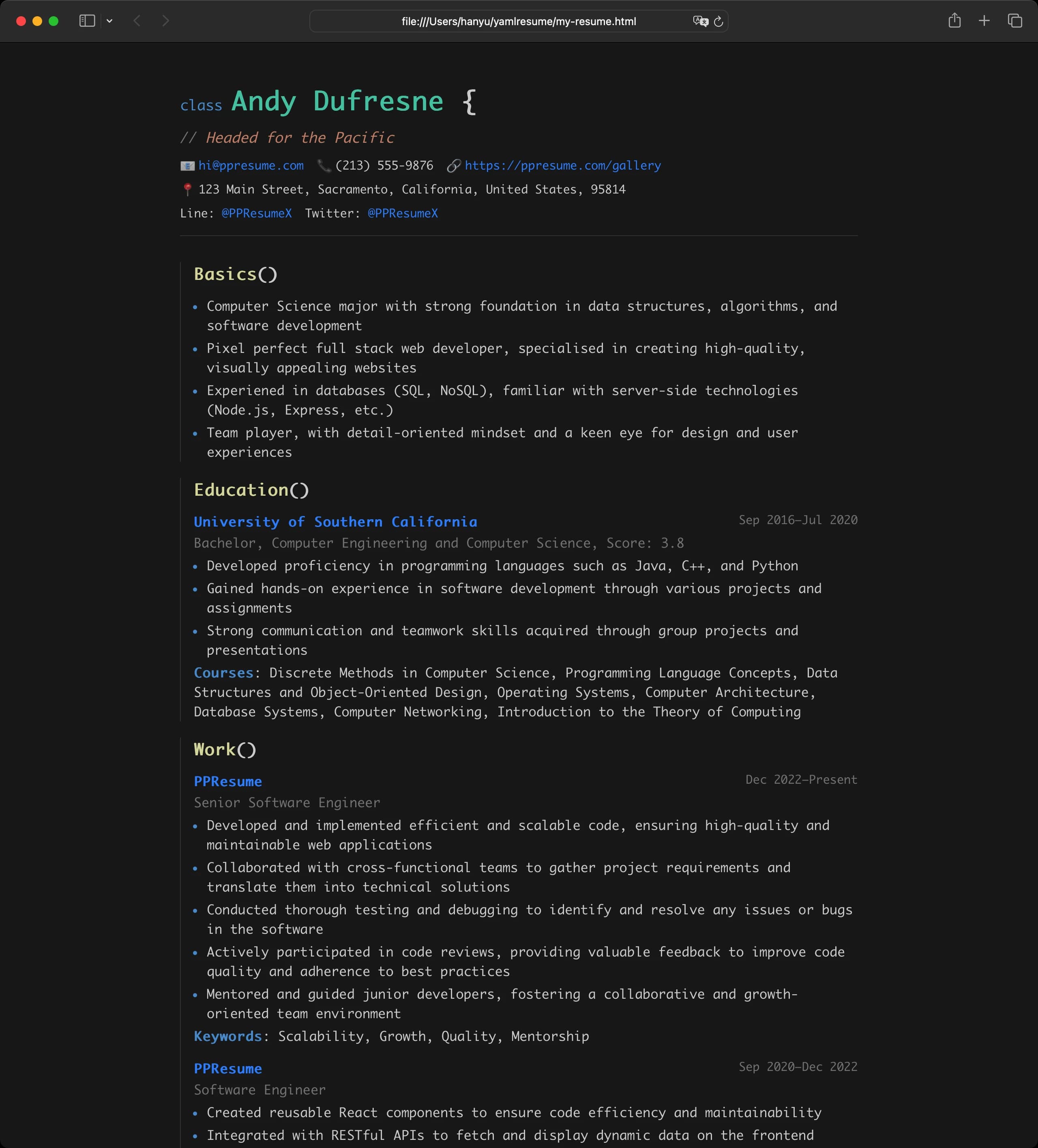
VS Code is a dark theme inspired by the "Dark+" color scheme of Visual Studio Code. It is specifically tailored for developers, software engineers, and technical professionals who want their resume to reflect their coding environment.
The template adopts a "Resume as Code" aesthetic, treating different parts of your profile as code elements:
- Name: Decorated as a
class(e.g.,class JohnDoe {) - Headline: Rendered as a code comment (e.g.,
// Full Stack Engineer) - Sections: Represented as function calls (e.g.,
experience()) - Skills/Languages: Styled as object property keys (e.g.,
JavaScript: Expert)
Under the hood, the template uses:
- Typography: Uses a monospace font stack (
Consolas,Monaco,Courier New,monospace) for an authentic IDE feel - Syntax Highlighting: Uses the official VS Code Dark+ color palette for keywords, strings, classes, and functions
- Layout Indentation: Features vertical indentation guides (border-left) to visually represent the scope of each section
Configuration
content:
  # ...

layouts:
  - engine: html
    template: vscode
    typography:
      fontSize: 16px
Features
- Developer-Centric: Perfect for signalling technical proficiency and a passion for coding
- Dark Mode by Default: High-contrast, easy-on-the-eyes dark theme
- Code-Like Structure: Unique visual metaphors that make technical resumes stand out
- Responsive: Fully adapted for both desktop and mobile viewing with consistent code semantics
- Syntax Styling: Uses familiar IDE colors to differentiate between roles, dates, and descriptions
Preview
The VS Code template provides a distinctive, modern look that immediately connects with technical recruiters and hiring managers. It transforms your career history into a clean, readable, and visually familiar "source file".
Edit on GitHub
Last updated on