YAMLResume v0.18 is out. The headline feature is the new Typst engine, which gives YAMLResume a second PDF typesetting path alongside LaTeX. This release also adds Italian, expands the sample library from 10 to 20 resumes, and improves link styling, PDF diagnostics, and AI provider defaults.
A New Typst Engine
Typst is a modern typesetting system with a concise, programmable syntax. YAMLResume can now turn the same YAML content into LaTeX or Typst source and compile either one into a professional PDF.
Add a Typst layout to your resume:
layouts:
  - engine: typst
    template: jake
    typography:
      fontSize: 10pt
      links:
        underline: false
    theme:
      colors:
        accent: burgundy
The first Typst template is jake, a
port of the clean, ATS-friendly LaTeX Jake design. It supports localized terms,
Markdown summaries, page margins, font families, line spacing, accent colors,
section aliases and ordering, icons, URLs, and locale-aware CJK font fallbacks.
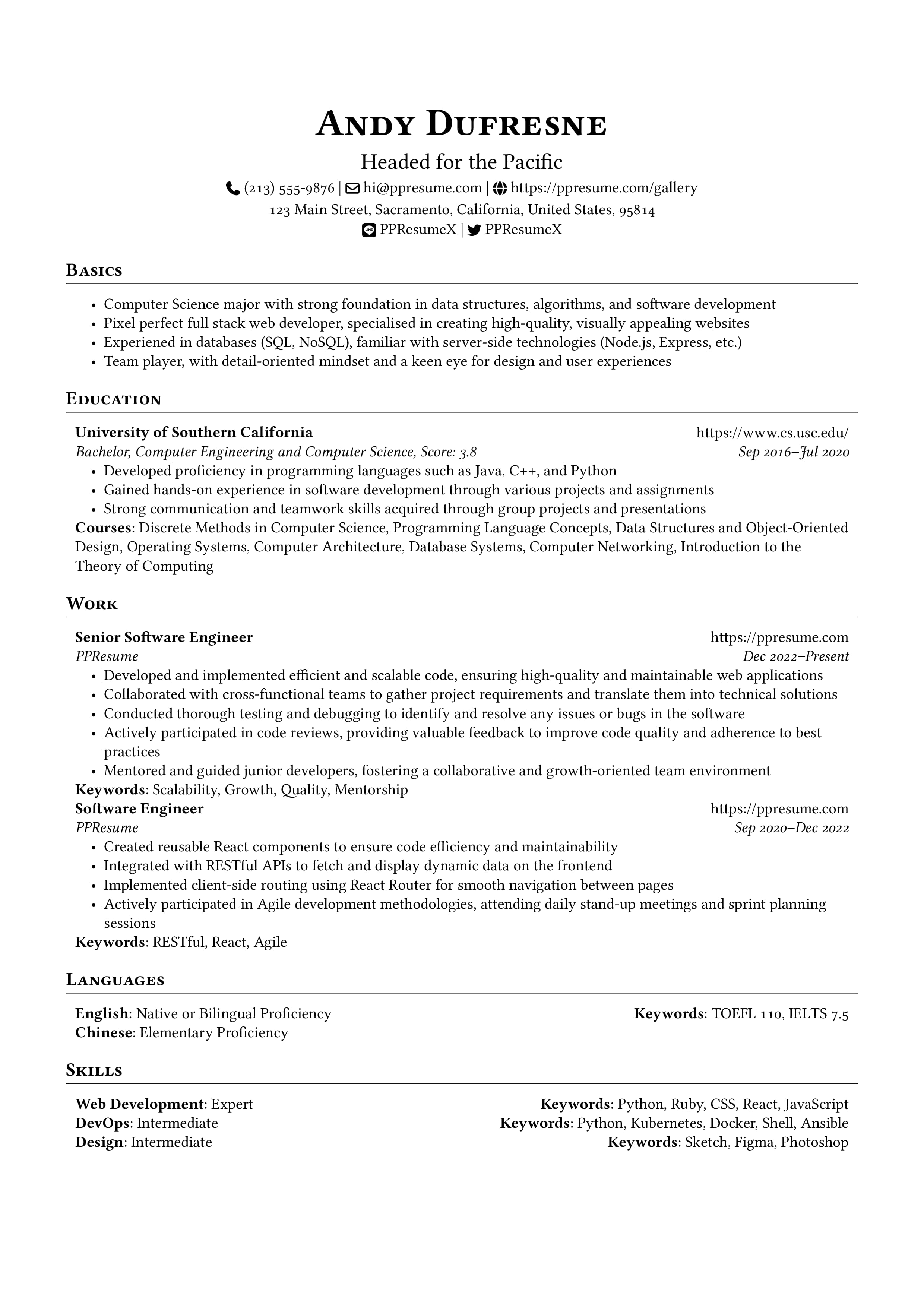
You can inspect the generated Typst source in the playground or read the Typst engine guide for every option.
Installation and Default Layouts
PDF compilation requires Typst 0.13.0 or newer. The official Docker image
includes Typst 0.15.1, so Docker users do not need a separate installation.
Run yamlresume doctor to check your local setup.
Starting with v0.18, yamlresume new includes a Typst layout in the default
layouts array. If you create a resume with the new defaults, install Typst
before building all PDF outputs, use the official Docker image, or skip PDF
compilation when you only need source files:
$ yamlresume build resume.yml --no-pdfExisting resumes with an explicit layouts array keep their configured
engines. When a resume enables both LaTeX and Typst, their PDFs are named
resume.tex.pdf and resume.typ.pdf so one cannot overwrite the other. A
single enabled PDF engine keeps the traditional resume.pdf filename.
Italian Locale Support
Italian joins the built-in locales as it, bringing YAMLResume to 13 locale
codes across 11 languages. It includes localized section titles, education
degrees, language fluency levels, country names, and idiomatic lowercase month
names.
locale:
  language: it
Create an Italian resume directly from a sample:
$ yamlresume new resume.it.yml --sample software-engineer --language itSee the Italian locale guide or browse the Italian gallery.
20 Sample Resumes Across 13 Locales
The curated sample library has doubled from 10 to 20 resumes, covering a broader range of technical, design, business, healthcare, and public-service roles. Every sample is available in all 13 locale codes, and the gallery now publishes HTML, DOCX, PDF, LaTeX, Typst, Markdown, and preview images for each localized resume.
Explore the gallery, list samples from your terminal, or create a local copy:
$ yamlresume samples list
$ yamlresume new resume.yml --sample registered-nurse --language it
The samples package documentation covers the programmatic APIs.
Shared Link Underline Controls
The typography.links.underline option now works consistently across LaTeX,
Typst, HTML, and DOCX:
layouts:
  - engine: typst
    typography:
      links:
        underline: true
LaTeX and Typst use fixed-baseline underlines, and LaTeX skips descenders so underlines remain legible without changing text spacing. HTML and DOCX honor the same setting, giving all four visual engines a shared link-styling contract.
Clearer PDF Builds
PDF builds now verify that the expected file exists and is non-empty before reporting success. LaTeX and Typst compiler warnings are also surfaced instead of being hidden in debug logs, while expected warnings about optional CJK fallback fonts are filtered from Typst output.
Together with the engine-specific PDF filenames, these changes make multi-engine builds easier to understand and diagnose.
Updated AI Provider Defaults
The built-in AI generation and translation commands now use current default model IDs:
| Provider | Environment variable | Default model |
|---|---|---|
| DeepSeek | DEEPSEEK_API_KEY | deepseek-flash |
| Kimi | MOONSHOT_API_KEY | kimi-k3.1-pro |
| OpenAI | OPENAI_API_KEY | gpt-5.6-luna |
| Ollama | OLLAMA_HOST | llama3.2 |
OpenAI-compatible providers now consistently use the Chat Completions API. You can still override the model and base URL with CLI options or environment variables; see the AI generation guide.
Breaking Change: Engine-Specific Renderer Names
Adding Typst required the LaTeX renderer class names to become explicit. If you
import renderer classes directly from @yamlresume/core, update these imports:
| v0.17 | v0.18 |
|---|---|
JakeRenderer | JakeLatexRenderer |
ModerncvBankingRenderer | ModerncvBankingLatexRenderer |
ModerncvCasualRenderer | ModerncvCasualLatexRenderer |
ModerncvClassicRenderer | ModerncvClassicLatexRenderer |
The new Typst implementation is available as JakeTypstRenderer. YAML resume
files and users of the higher-level rendering APIs do not need to change their
configuration.
Get v0.18
Update with your favorite package manager:
$ npm install -g yamlresume@latest
$ yarn global add yamlresume@latest
$ pnpm add -g yamlresume@latest
$ brew upgrade yamlresume
Or pull the new image:
$ docker pull yamlresume/yamlresume:latestCheck out the installation guide, try Typst in the playground, and explore the expanded gallery. If you run into anything, open an issue on GitHub. The full list of changes is in the changelog.
Enjoy v0.18!
Written by
Xiao HanyuAt