Jake's Resume is one of the most popular LaTeX resume templates ever made. Created by Jake Gutierrez on top of sb2nov's resume, it has earned over 2,800 stars on GitHub and become a default recommendation in resume communities for its clean, single-column, ATS-friendly design.
YAMLResume adopted Jake's Resume as an official LaTeX template in v0.12. In this post we will show you what Jake's Resume looks like on YAMLResume, and — more importantly — what YAMLResume improves over the original template.
The Original Jake's Resume
The original template is a single resume.tex file. Before you write a single
word of content, you wade through about 100 lines of preamble: packages,
margin hacks, section formatting, and a family of custom macros like
\resumeSubheading, \resumeItem, and \resumeProjectHeading.
Content is then written directly in LaTeX:
\section{Education}
  \resumeSubHeadingListStart
    \resumeSubheading
      {Southwestern University}{Georgetown, TX}
      {Bachelor of Arts in Computer Science, Minor in Business}{Aug. 2018 -- May 2021}
  \resumeSubHeadingListEnd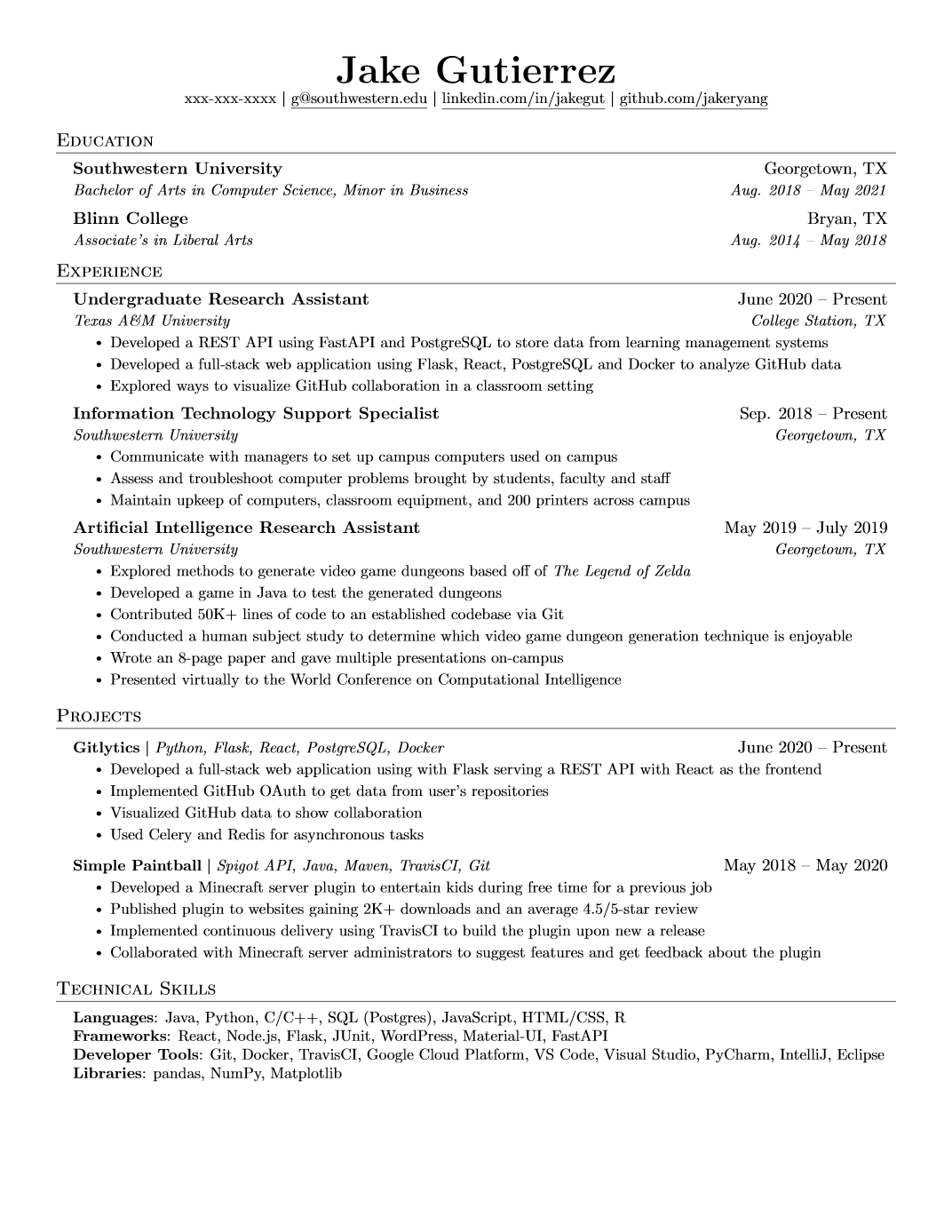
The result is beautiful, but the authoring experience is pure LaTeX: you
hand-type every date range, escape every special character (Texas A\&M University), and debug brace mismatches through LaTeX's famously cryptic
error logs. Want a different font? Comment and uncomment \usepackage lines.
Want a second language? Rewrite the file.
For the curious, here is the full 218-line resume.tex source:
Original Jake's Resume — full LaTeX source (218 lines)
%-------------------------
% Resume in Latex
% Author : Jake Gutierrez
% Based off of: https://github.com/sb2nov/resume
% License : MIT
%------------------------

\documentclass[letterpaper,11pt]{article}

\usepackage{latexsym}
\usepackage[empty]{fullpage}
\usepackage{titlesec}
\usepackage{marvosym}
\usepackage[usenames,dvipsnames]{color}
\usepackage{verbatim}
\usepackage{enumitem}
\usepackage[hidelinks]{hyperref}
\usepackage{fancyhdr}
\usepackage[english]{babel}
\usepackage{tabularx}
\input{glyphtounicode}


%----------FONT OPTIONS----------
% sans-serif
% \usepackage[sfdefault]{FiraSans}
% \usepackage[sfdefault]{roboto}
% \usepackage[sfdefault]{noto-sans}
% \usepackage[default]{sourcesanspro}

% serif
% \usepackage{CormorantGaramond}
% \usepackage{charter}


\pagestyle{fancy}
\fancyhf{} % clear all header and footer fields
\fancyfoot{}
\renewcommand{\headrulewidth}{0pt}
\renewcommand{\footrulewidth}{0pt}

% Adjust margins
\addtolength{\oddsidemargin}{-0.5in}
\addtolength{\evensidemargin}{-0.5in}
\addtolength{\textwidth}{1in}
\addtolength{\topmargin}{-.5in}
\addtolength{\textheight}{1.0in}

\urlstyle{same}

\raggedbottom
\raggedright
\setlength{\tabcolsep}{0in}

% Sections formatting
\titleformat{\section}{
  \vspace{-4pt}\scshape\raggedright\large
}{}{0em}{}[\color{black}\titlerule \vspace{-5pt}]

% Ensure that generate pdf is machine readable/ATS parsable
\pdfgentounicode=1

%-------------------------
% Custom commands
\newcommand{\resumeItem}[1]{
  \item\small{
    {#1 \vspace{-2pt}}
  }
}

\newcommand{\resumeSubheading}[4]{
  \vspace{-2pt}\item
    \begin{tabular*}{0.97\textwidth}[t]{l@{\extracolsep{\fill}}r}
      \textbf{#1} & #2 \\
      \textit{\small#3} & \textit{\small #4} \\
    \end{tabular*}\vspace{-7pt}
}

\newcommand{\resumeSubSubheading}[2]{
    \item
    \begin{tabular*}{0.97\textwidth}{l@{\extracolsep{\fill}}r}
      \textit{\small#1} & \textit{\small #2} \\
    \end{tabular*}\vspace{-7pt}
}

\newcommand{\resumeProjectHeading}[2]{
    \item
    \begin{tabular*}{0.97\textwidth}{l@{\extracolsep{\fill}}r}
      \small#1 & #2 \\
    \end{tabular*}\vspace{-7pt}
}

\newcommand{\resumeSubItem}[1]{\resumeItem{#1}\vspace{-4pt}}

\renewcommand\labelitemii{$\vcenter{\hbox{\tiny$\bullet$}}$}

\newcommand{\resumeSubHeadingListStart}{\begin{itemize}[leftmargin=0.15in, label={}]}
\newcommand{\resumeSubHeadingListEnd}{\end{itemize}}
\newcommand{\resumeItemListStart}{\begin{itemize}}
\newcommand{\resumeItemListEnd}{\end{itemize}\vspace{-5pt}}

%-------------------------------------------
%%%%%%  RESUME STARTS HERE  %%%%%%%%%%%%%%%%%%%%%%%%%%%%


\begin{document}

%----------HEADING----------
% \begin{tabular*}{\textwidth}{l@{\extracolsep{\fill}}r}
%   \textbf{\href{http://sourabhbajaj.com/}{\Large Sourabh Bajaj}} & Email : \href{mailto:sourabh@sourabhbajaj.com}{sourabh@sourabhbajaj.com}\\
%   \href{http://sourabhbajaj.com/}{http://www.sourabhbajaj.com} & Mobile : +1-123-456-7890 \\
% \end{tabular*}

\begin{center}
    \textbf{\Huge \scshape Jake Ryan} \\ \vspace{1pt}
    \small 123-456-7890 $|$ \href{mailto:x@x.com}{\underline{jake@su.edu}} $|$
    \href{https://linkedin.com/in/...}{\underline{linkedin.com/in/jake}} $|$
    \href{https://github.com/...}{\underline{github.com/jake}}
\end{center}


%-----------EDUCATION-----------
\section{Education}
  \resumeSubHeadingListStart
    \resumeSubheading
      {Southwestern University}{Georgetown, TX}
      {Bachelor of Arts in Computer Science, Minor in Business}{Aug. 2018 -- May 2021}
    \resumeSubheading
      {Blinn College}{Bryan, TX}
      {Associate's in Liberal Arts}{Aug. 2014 -- May 2018}
  \resumeSubHeadingListEnd


%-----------EXPERIENCE-----------
\section{Experience}
  \resumeSubHeadingListStart

    \resumeSubheading
      {Undergraduate Research Assistant}{June 2020 -- Present}
      {Texas A\&M University}{College Station, TX}
      \resumeItemListStart
        \resumeItem{Developed a REST API using FastAPI and PostgreSQL to store data from learning management systems}
        \resumeItem{Developed a full-stack web application using Flask, React, PostgreSQL and Docker to analyze GitHub data}
        \resumeItem{Explored ways to visualize GitHub collaboration in a classroom setting}
      \resumeItemListEnd

% -----------Multiple Positions Heading-----------
%    \resumeSubSubheading
%     {Software Engineer I}{Oct 2014 - Sep 2016}
%     \resumeItemListStart
%        \resumeItem{Apache Beam}
%          {Apache Beam is a unified model for defining both batch and streaming data-parallel processing pipelines}
%     \resumeItemListEnd
%    \resumeSubHeadingListEnd
%-------------------------------------------

    \resumeSubheading
      {Information Technology Support Specialist}{Sep. 2018 -- Present}
      {Southwestern University}{Georgetown, TX}
      \resumeItemListStart
        \resumeItem{Communicate with managers to set up campus computers used on campus}
        \resumeItem{Assess and troubleshoot computer problems brought by students, faculty and staff}
        \resumeItem{Maintain upkeep of computers, classroom equipment, and 200 printers across campus}
    \resumeItemListEnd

    \resumeSubheading
      {Artificial Intelligence Research Assistant}{May 2019 -- July 2019}
      {Southwestern University}{Georgetown, TX}
      \resumeItemListStart
        \resumeItem{Explored methods to generate video game dungeons based off of \emph{The Legend of Zelda}}
        \resumeItem{Developed a game in Java to test the generated dungeons}
        \resumeItem{Contributed 50K+ lines of code to an established codebase via Git}
        \resumeItem{Conducted  a human subject study to determine which video game dungeon generation technique is enjoyable}
        \resumeItem{Wrote an 8-page paper and gave multiple presentations on-campus}
        \resumeItem{Presented virtually to the World Conference on Computational Intelligence}
      \resumeItemListEnd

  \resumeSubHeadingListEnd


%-----------PROJECTS-----------
\section{Projects}
    \resumeSubHeadingListStart
      \resumeProjectHeading
          {\textbf{Gitlytics} $|$ \emph{Python, Flask, React, PostgreSQL, Docker}}{June 2020 -- Present}
          \resumeItemListStart
            \resumeItem{Developed a full-stack web application using with Flask serving a REST API with React as the frontend}
            \resumeItem{Implemented GitHub OAuth to get data from user’s repositories}
            \resumeItem{Visualized GitHub data to show collaboration}
            \resumeItem{Used Celery and Redis for asynchronous tasks}
          \resumeItemListEnd
      \resumeProjectHeading
          {\textbf{Simple Paintball} $|$ \emph{Spigot API, Java, Maven, TravisCI, Git}}{May 2018 -- May 2020}
          \resumeItemListStart
            \resumeItem{Developed a Minecraft server plugin to entertain kids during free time for a previous job}
            \resumeItem{Published plugin to websites gaining 2K+ downloads and an average 4.5/5-star review}
            \resumeItem{Implemented continuous delivery using TravisCI to build the plugin upon new a release}
            \resumeItem{Collaborated with Minecraft server administrators to suggest features and get feedback about the plugin}
          \resumeItemListEnd
    \resumeSubHeadingListEnd


%
%-----------PROGRAMMING SKILLS-----------
\section{Technical Skills}
 \begin{itemize}[leftmargin=0.15in, label={}]
    \small{\item{
     \textbf{Languages}{: Java, Python, C/C++, SQL (Postgres), JavaScript, HTML/CSS, R} \\
     \textbf{Frameworks}{: React, Node.js, Flask, JUnit, WordPress, Material-UI, FastAPI} \\
     \textbf{Developer Tools}{: Git, Docker, TravisCI, Google Cloud Platform, VS Code, Visual Studio, PyCharm, IntelliJ, Eclipse} \\
     \textbf{Libraries}{: pandas, NumPy, Matplotlib}
    }}
 \end{itemize}


%-------------------------------------------
\end{document}
Jake's Resume in YAMLResume
On YAMLResume, the same resume is pure, structured YAML. Here is Jake Ryan's resume, rewritten:
# yaml-language-server: $schema=https://yamlresume.dev/schema.json

---
content:
  basics:
    name: Jake Ryan
    phone: 123-456-7890
    email: jake@su.edu
  profiles:
    - network: LinkedIn
      url: https://linkedin.com/in/jake
      username: linkedin.com/in/jake
    - network: GitHub
      url: https://github.com/jake
      username: github.com/jake
  education:
    - institution: Southwestern University
      degree: Bachelor
      area: Computer Science, Minor in Business
      startDate: Aug 2018
      endDate: May 2021
    - institution: Blinn College
      degree: Associate
      area: Liberal Arts
      startDate: Aug 2014
      endDate: May 2018
  work:
    - name: Texas A&M University
      position: Undergraduate Research Assistant
      startDate: Jun 2020
      summary: |
        - Developed a REST API using **FastAPI** and **PostgreSQL** to store data from learning management systems
        - Developed a full-stack web application using Flask, React, PostgreSQL and Docker to analyze GitHub data
        - Explored ways to visualize GitHub collaboration in a classroom setting
    - name: Southwestern University
      position: Information Technology Support Specialist
      startDate: Sep 2018
      summary: |
        - Communicate with managers to set up campus computers used on campus
        - Assess and troubleshoot computer problems brought by students, faculty and staff
        - Maintain upkeep of computers, classroom equipment, and 200 printers across campus
    - name: Southwestern University
      position: Artificial Intelligence Research Assistant
      startDate: May 2019
      endDate: Jul 2019
      summary: |
        - Explored methods to generate video game dungeons based off of *The Legend of Zelda*
        - Developed a game in Java to test the generated dungeons
        - Contributed 50K+ lines of code to an established codebase via Git
        - Conducted a human subject study to determine which video game dungeon generation technique is enjoyable
        - Wrote an 8-page paper and gave multiple presentations on-campus
        - Presented virtually to the World Conference on Computational Intelligence
  projects:
    - name: Gitlytics
      description: Python, Flask, React, PostgreSQL, Docker
      startDate: Jun 2020
      summary: |
        - Developed a full-stack web application with Flask serving a REST API and React as the frontend
        - Implemented GitHub OAuth to get data from user repositories
        - Visualized GitHub data to show collaboration
        - Used Celery and Redis for asynchronous tasks
    - name: Simple Paintball
      description: Spigot API, Java, Maven, TravisCI, Git
      startDate: May 2018
      endDate: May 2020
      summary: |
        - Developed a Minecraft server plugin to entertain kids during free time for a previous job
        - Published plugin to websites gaining 2K+ downloads and an average 4.5/5-star review
        - Implemented continuous delivery using TravisCI to build the plugin upon a new release
        - Collaborated with Minecraft server administrators to suggest features and get feedback about the plugin
  skills:
    - name: Languages
      keywords: [Java, Python, C/C++, SQL (Postgres), JavaScript, HTML/CSS, R]
    - name: Frameworks
      keywords: [React, Node.js, Flask, JUnit, WordPress, Material-UI, FastAPI]
    - name: Developer Tools
      keywords: [Git, Docker, TravisCI, Google Cloud Platform, VS Code, Visual Studio, PyCharm, IntelliJ, Eclipse]
    - name: Libraries
      keywords: [pandas, NumPy, Matplotlib]

locale:
  language: en

layouts:
  - engine: latex
    template: jake
Then build it:
$ yamlresume build resume.yml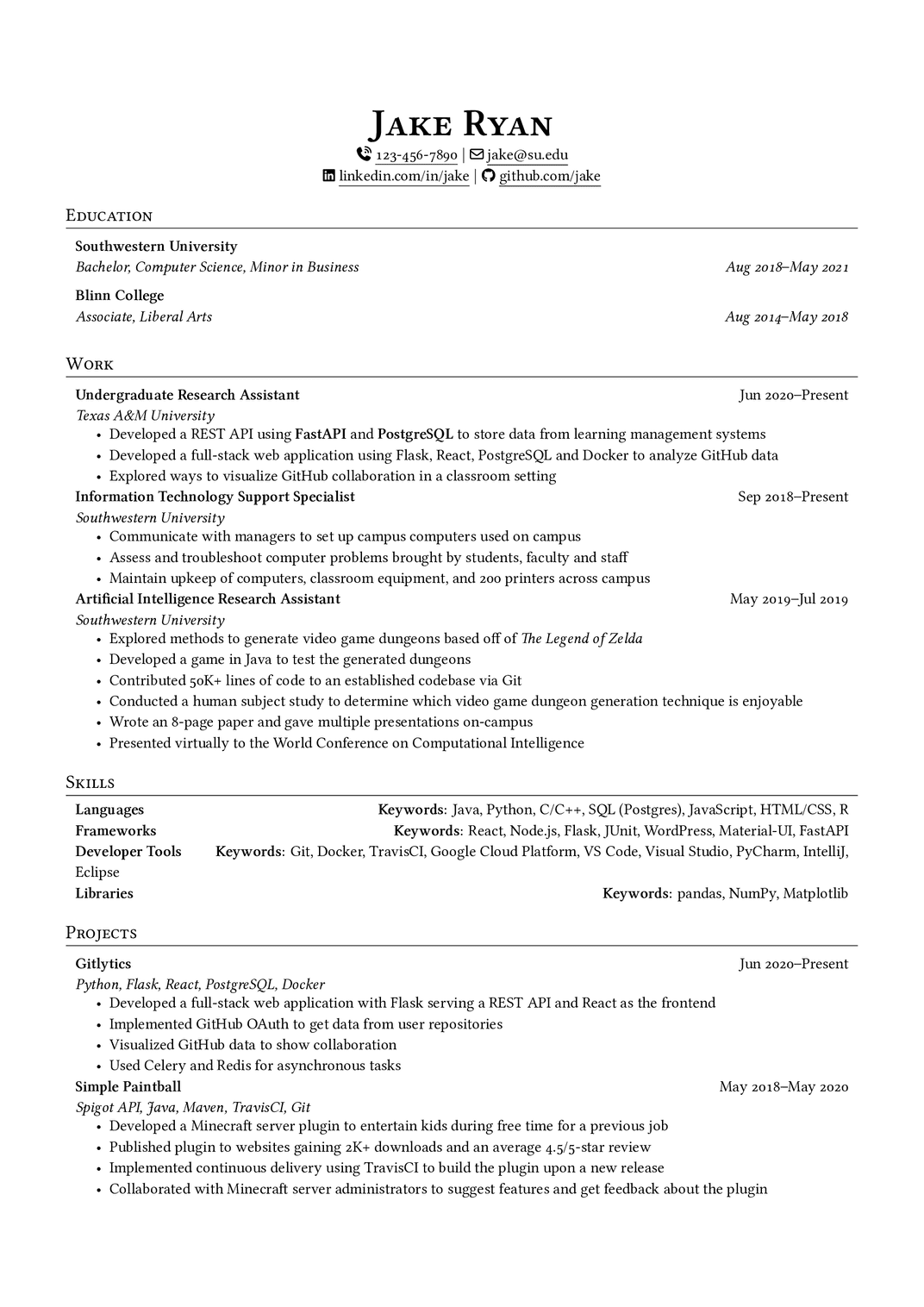
You get the signature Jake's Resume look — the centered name, the
$|$-separated contact line, the ruled section headings, the aligned date
ranges — without writing a single line of LaTeX. You can also browse a live
example in our template gallery and read the
template documentation.
For comparison, here is the complete LaTeX source that YAMLResume generates from the YAML above. You never write or edit this file by hand — it is regenerated from your YAML on every build:
YAMLResume-generated Jake's Resume — full LaTeX source (185 lines)
\documentclass[a4paper,10pt]{article}

\usepackage{changepage}
\usepackage[usenames,dvipsnames]{color}
\usepackage{enumitem}
\IfFileExists{fontawesome7.sty}{%
  \usepackage{fontawesome7}%
}{%
  \usepackage{fontawesome5}%
}
\usepackage[hidelinks]{hyperref}
\usepackage{titlesec}

%% page layout/margins
\usepackage[top=2.5cm, bottom=2.5cm, left=1.5cm, right=1.5cm]{geometry}

% Disable page numbers
\pagenumbering{gobble}

%% Babel config for English language
\usepackage[english]{babel}

%% fontspec
\usepackage{fontspec}

\IfFontExistsTF{Linux Libertine}{
  \setmainfont[Ligatures={TeX, Common}, Numbers=OldStyle]{Linux Libertine}
}{}
\IfFontExistsTF{Linux Libertine O}{
  \setmainfont[Ligatures={TeX, Common}, Numbers=OldStyle]{Linux Libertine O}
}{}

%% CTeX
% CJK support, used to show CJK characters in the resume
%
% - fontset=none: disable builtin fontset but instead set the CJK font manually
% - heading=false: disable ctex heading
% - punct=kaiming: use kaiming punctuations styles for CJK
% - scheme=plain: use plain scheme, do not override \normalsize font size
% - space=auto: space settings for CJK characters
%
% ref:
% - http://ctan.mirrorcatalogs.com/language/chinese/ctex/ctex.pdf
\usepackage[UTF8, heading=false, punct=kaiming, scheme=plain, space=auto]{ctex}

\IfFontExistsTF{Noto Serif CJK SC}{
  \setCJKmainfont{Noto Serif CJK SC}
}{}
\IfFontExistsTF{Noto Sans CJK SC}{
  \setCJKsansfont{Noto Sans CJK SC}
}{}

%% line spacing
\usepackage{setspace}
\setstretch{1.125}

%% URL styling - use normal text instead of monospace
\urlstyle{same}

% Auto-underline all links
% Defer until \begin{document} so hyperref is already loaded
\AtBeginDocument{%
  \let\oldhref\href
  \renewcommand{\href}[2]{\oldhref{#1}{\underline{#2}}}%
}

%% PDF metadata
\hypersetup{
  pdfauthor={Jake Ryan},
  pdftitle={Jake Ryan},
  pdfkeywords={Languages, Frameworks, Developer Tools, Libraries},
  pdfsubject={Résumé of Jake Ryan},
  pdfcreator={YAMLResume (https://yamlresume.dev)},
}

% global itemize spacing
\setlist[itemize]{nosep}
\setlength{\parindent}{0pt}

% Sections formatting
\titleformat{\section}{
  \vspace{-4pt}\scshape\raggedright\large
}{}{0em}{}[\color{black}\titlerule \vspace{-5pt}]

% Custom commands
\newcommand{\resumeSubheading}[4]{
  \begin{tabular*}{\textwidth}[t]{l@{\extracolsep{\fill}}r}
    \textbf{#1} & #2 \\
    \textit{#3} & \textit{#4} \\
  \end{tabular*}
}


\begin{document}

\begin{center}
\textbf{\Huge \scshape Jake Ryan}\vspace{2pt}

{\Large }

{\small \faPhoneVolume}~\href{tel:123-456-7890}{123-456-7890} $|$ {\small \faEnvelope[regular]}~\href{mailto:jake@su.edu}{jake@su.edu}


{\small \faLinkedin}\ \href{https://linkedin.com/in/jake}{linkedin.com/in/jake} $|$ {\small \faGithub}\ \href{https://github.com/jake}{github.com/jake}
\end{center}

\section{Education}
\resumeSubheading
{Southwestern University}{}
{Bachelor, Computer Science, Minor in Business}{Aug 2018–May 2021}

\resumeSubheading
{Blinn College}{}
{Associate, Liberal Arts}{Aug 2014–May 2018}
\section{Work}
\resumeSubheading
{Undergraduate Research Assistant}{Jun 2020–Present}
{Texas A\&M University}{}
\begin{adjustwidth}{6pt}{6pt}
\begin{itemize}
\item Developed a REST API using \textbf{FastAPI} and \textbf{PostgreSQL} to store data from learning management systems
\item Developed a full-stack web application using Flask, React, PostgreSQL and Docker to analyze GitHub data
\item Explored ways to visualize GitHub collaboration in a classroom setting
\end{itemize}
\end{adjustwidth}

\resumeSubheading
{Information Technology Support Specialist}{Sep 2018–Present}
{Southwestern University}{}
\begin{adjustwidth}{6pt}{6pt}
\begin{itemize}
\item Communicate with managers to set up campus computers used on campus
\item Assess and troubleshoot computer problems brought by students, faculty and staff
\item Maintain upkeep of computers, classroom equipment, and 200 printers across campus
\end{itemize}
\end{adjustwidth}

\resumeSubheading
{Artificial Intelligence Research Assistant}{May 2019–Jul 2019}
{Southwestern University}{}
\begin{adjustwidth}{6pt}{6pt}
\begin{itemize}
\item Explored methods to generate video game dungeons based off of \textit{The Legend of Zelda}
\item Developed a game in Java to test the generated dungeons
\item Contributed 50K+ lines of code to an established codebase via Git
\item Conducted a human subject study to determine which video game dungeon generation technique is enjoyable
\item Wrote an 8-page paper and gave multiple presentations on-campus
\item Presented virtually to the World Conference on Computational Intelligence
\end{itemize}
\end{adjustwidth}
\section{Skills}
\begin{adjustwidth}{6pt}{6pt}
\textbf{Languages} \hfill \textbf{Keywords}: Java, Python, C/C++, SQL (Postgres), JavaScript, HTML/CSS, R

\textbf{Frameworks} \hfill \textbf{Keywords}: React, Node.js, Flask, JUnit, WordPress, Material-UI, FastAPI

\textbf{Developer Tools} \hfill \textbf{Keywords}: Git, Docker, TravisCI, Google Cloud Platform, VS Code, Visual Studio, PyCharm, IntelliJ, Eclipse

\textbf{Libraries} \hfill \textbf{Keywords}: pandas, NumPy, Matplotlib
\end{adjustwidth}
\section{Projects}
\resumeSubheading
{Gitlytics}{Jun 2020–Present}
{Python, Flask, React, PostgreSQL, Docker}{}
\begin{adjustwidth}{6pt}{6pt}
\begin{itemize}
\item Developed a full-stack web application with Flask serving a REST API and React as the frontend
\item Implemented GitHub OAuth to get data from user repositories
\item Visualized GitHub data to show collaboration
\item Used Celery and Redis for asynchronous tasks
\end{itemize}
\end{adjustwidth}

\resumeSubheading
{Simple Paintball}{May 2018–May 2020}
{Spigot API, Java, Maven, TravisCI, Git}{}
\begin{adjustwidth}{6pt}{6pt}
\begin{itemize}
\item Developed a Minecraft server plugin to entertain kids during free time for a previous job
\item Published plugin to websites gaining 2K+ downloads and an average 4.5/5-star review
\item Implemented continuous delivery using TravisCI to build the plugin upon a new release
\item Collaborated with Minecraft server administrators to suggest features and get feedback about the plugin
\end{itemize}
\end{adjustwidth}
\end{document}
What We Kept
We deliberately preserved the design DNA that makes Jake's Resume Jake's Resume. In fact, after adapting the template to YAMLResume's architecture, only two pieces of the original preamble survived:
% Sections formatting
\titleformat{\section}{
  \vspace{-4pt}\scshape\raggedright\large
}{}{0em}{}[\color{black}\titlerule \vspace{-5pt}]

% Custom commands
\newcommand{\resumeSubheading}[4]{
  \begin{tabular*}{\textwidth}[t]{l@{\extracolsep{\fill}}r}
    \textbf{#1} & #2 \\
    \textit{#3} & \textit{#4} \\
  \end{tabular*}
}\titleformat— the small-caps section heading with a horizontal rule\resumeSubheading— the two-row entry header with right-aligned dates, used for work, education, projects, and all other dated sections
Together with the centered header, the $|$ contact separator, and the
compact nosep itemize lists, these carry the entire visual identity of the
template. Everything else — about a dozen packages and a page of macros — was
replaced by YAMLResume's shared rendering pipeline.
What We Improved
Keeping the look was the easy part. The real value is everything YAMLResume adds around it.
Content, finally separated from presentation
In the original template, your resume is LaTeX code. In YAMLResume, your resume is data. Switching templates is a one-line change:
layouts:
  - engine: latex
    template: jake                  # or moderncv-banking, moderncv-casual, ...
And because layouts is a list, one YAML file can produce a Jake's Resume
PDF, a web-ready HTML page, and a
Markdown copy for plain-text application forms — all
in a single yamlresume build.
Structured data with schema validation
Every field is defined in a public JSON
Schema. With the yaml-language-server directive at
the top of your file, your editor provides autocompletion, inline
documentation, and validation as you type. Degrees, language fluencies, skill
levels, and profile networks are enums — typos are caught before you ever
compile, not after a 40-line LaTeX error log.
No more manual escaping
The original template forces you to write Texas A\&M University. In
YAMLResume you write Texas A&M University — LaTeX escaping is applied
automatically at render time, everywhere, consistently.
Structured, localized dates
Dates are data (startDate: Aug 2018), not strings baked into macros.
YAMLResume formats them consistently across the whole document, and an empty
endDate renders as "Present" — translated into your resume's language.
Real internationalization
The original template is hardwired to English. YAMLResume supports 12 locale
languages — English, Chinese (Simplified, Traditional HK,
Traditional TW), Spanish, French, Norwegian, Dutch, Japanese, German,
Indonesian, and Brazilian Portuguese. Section titles, degrees, fluency levels,
and date formats are translated automatically, with per-language babel
setup and proper CJK typesetting via ctex and Noto fonts.
Markdown summaries
Every summary field accepts a practical subset of markdown — bold,
italic, lists, and links — which is converted to
correct LaTeX. In the original template you hand-write \textbf{} and
itemize environments inline.
Typography and layout controls
What requires editing the preamble in the original is a config option here:
layouts:
  - engine: latex
    template: jake
    page:
      paperSize: a4            # a4 | letter
      showPageNumbers: true
      margins:
        top: 2.5cm
        bottom: 2.5cm
        left: 1.5cm
        right: 1.5cm
    typography:
      fontSize: 11pt           # 10pt | 11pt | 12pt
      lineSpacing: relaxed     # tight | snug | normal | relaxed | loose
      fontFamily: Linux Libertine O
    advanced:
      showIcons: true
      showUrls: true
Margins are handled by the geometry package instead of the original's
negative-margin \addtolength hacks, and fonts are resolved with
\IfFontExistsTF fallbacks instead of comment/uncomment roulette.
Section aliases and reordering
Rename any section title or change the section order without touching LaTeX — for example, put Projects before Work, or rename "Work" to "Experience":
layouts:
  - engine: latex
    template: jake
    sections:
      aliases:
        work: Experience
      order:
        - projects
        - work
See section aliases and section reorder for details.
Modern links, icons, and PDF metadata
The header contact line gets clickable tel: and mailto: links, underlined
\hrefs with hidden link borders, and optional FontAwesome icons (with an
automatic fontawesome7 → fontawesome5 fallback). The generated PDF also
carries proper metadata — author, title, and keywords derived from your
skills — which the original template never sets.
Tested and maintained
The Jake renderer ships with over 700 lines of unit tests covering the
preamble, every section, and every layout option, and it is built on the same
shared LatexRenderer base as our moderncv templates — so improvements to
the pipeline land on Jake's Resume automatically.
At a Glance
| Original Jake's Resume | YAMLResume template: jake | |
|---|---|---|
| Authoring format | Raw LaTeX | Structured YAML |
| Validation | LaTeX compile errors | JSON Schema + IDE completion |
| Special characters | Manual escaping | Automatic |
| Dates | Hand-typed strings | Structured, localized |
| Languages | English only | 12 locale languages, CJK ready |
| Rich text | Inline LaTeX macros | Markdown summaries |
| Templates | One file, one design | One line to switch |
| Output formats | PDF only | PDF, HTML, Markdown |
| Layout customization | Edit the preamble | Config options |
| Section rename/reorder | Rewrite macros | Config options |
Try It Today
$ npm install -g yamlresume
$ yamlresume new resume.yml
# edit resume.yml, set `template: jake`
$ yamlresume build resume.yml
Or open the playground and switch the template to jake to see
it live in your browser.
Credit
All credit for the original design goes to Jake Gutierrez and sb2nov, who released their templates under the MIT license and gave the community a modern classic. Our adaptation was tracked in issues #88 and #179, and shipped in YAMLResume v0.12.
As always, we welcome your feedback and contributions on GitHub. Happy building!
Written by
Xiao HanyuAt
Sat Oct 03 2026