We're excited to announce the release of YAMLResume v0.9, introducing first-class support for HTML output. Following our v0.8 release that brought Markdown output, we're now taking another major step forward in making your resume data truly versatile and web-native.
With v0.9, you can now compile your YAML resume directly into a standalone, responsive HTML file—perfect for hosting on your personal website, GitHub Pages, or any static hosting platform. No more converting PDFs or manually maintaining separate web versions of your resume.
For now we only provide one template for HTML layout—the calm template, which is inspired by the moderncv LaTeX template. It features a minimalist design with clear section separation and an elegant layout optimized for web viewing. Here is the preview:
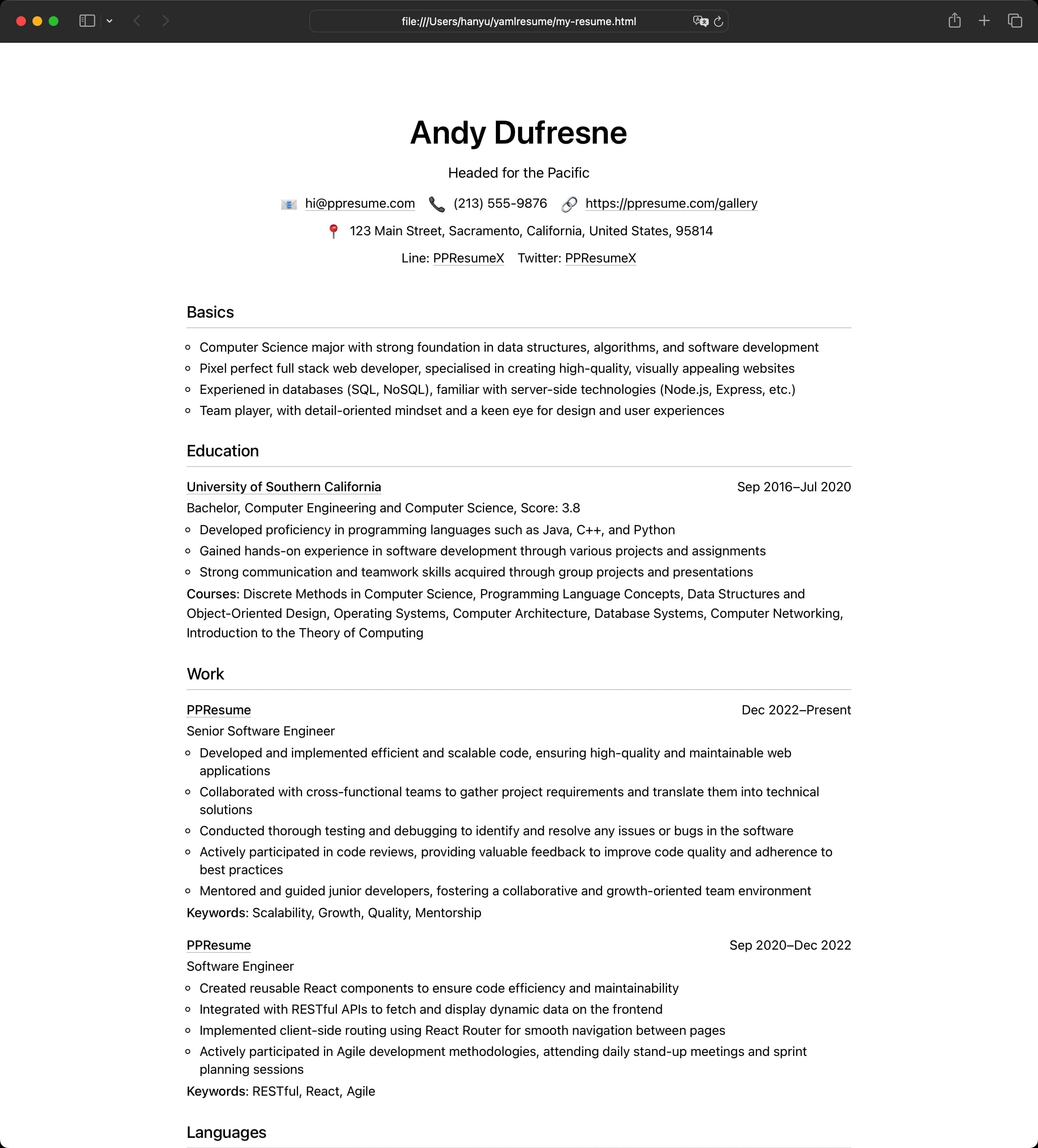
A quick demo for how to use YAMLResume v0.9 to generate HTML resume:

Why HTML?
When we introduced the multiple layouts architecture in v0.8,
we envisioned a world where your single resume.yml could be rendered into any
format you need. We started with LaTeX/PDF for
professional applications and Markdown for
interoperability and LLM workflows. Now, HTML completes the trinity of essential
resume formats.
HTML offers unique advantages:
Web-Native: HTML is the language of the web. Your resume becomes a first-class citizen on the internet, not just a document you have to embed or convert.
Responsive Design: Unlike PDFs that require pinching and zooming on mobile devices, HTML resumes adapt seamlessly to any screen size—from desktop monitors to smartphones.
SEO-Friendly: Search engines can index your HTML resume, making your skills and experience discoverable. This is impossible with PDF-only resumes.
Interactive: HTML enables clickable links, smooth scrolling, and other interactive elements that enhance the user experience beyond static documents.
Zero Dependencies: The HTML output is a self-contained file with inline CSS. Drop it anywhere—S3, Netlify, GitHub Pages—and it just works.
Getting Started
If you have yamlresume installed (version 0.9.0 or higher), adding HTML output
to your resume is as simple as updating your layouts configuration.
Step 1: Update Your Resume Configuration
Add the HTML layout to your resume.yml:
layouts:
  - engine: latex
    template: moderncv-banking
    typography:
      fontSize: 11pt
  - engine: markdown
  - engine: html        #[!codeghlight]
    template: calm      #[!codeghlight]
    typography:         #[!codeghlight]
      fontSize: 16px    #[!codeghlight]
The HTML engine supports customizable typography
with font sizes ranging from 14px to 20px. The default calm template is
inspired by the popular LaTeX moderncv package, providing a clean, professional
look.
Step 2: Build Your Resume
Run the build command:
$ yamlresume build my-resume.yml
✔ Generated resume tex file successfully: my-resume.tex
◐ Generating resume pdf file with command: xelatex -halt-on-error my-resume.tex...
✔ Generated resume pdf file successfully: my-resume.pdf
✔ Generated resume markdown file successfully: my-resume.md
✔ Generated resume html file successfully: my-resume.html
That's it! You now have three output files from a single source of truth.
The Calm Template
The initial release includes the calm template, a carefully designed layout
that balances professionalism with readability. The template features:
- Clean Typography: Optimized font sizes and line heights for both screen and print.
- Responsive Layout: Automatically adapts from wide desktop screens to narrow mobile displays.
- Semantic HTML: Uses proper HTML5 semantic elements for better accessibility and SEO.
- Print-Friendly: While designed for the web, the template includes print styles so it looks great when saved as PDF from the browser.
The design philosophy of the calm template mirrors the aesthetic of the LaTeX
moderncv templates—modern, uncluttered, and focused on content.
HTML Layout Features
Typography Customization
The HTML engine currently supports customization of font size:
layouts:
  - engine: html
    template: calm
    typography:
      fontSize: 16px  # Range: 14px to 20px
Font size adjustments affect the entire document proportionally, maintaining visual hierarchy and readability. We chose a range of 14px to 20px based on web typography best practices—ensuring legibility without sacrificing design.
Self-Contained Output
The generated HTML file is completely self-contained. All CSS styles are inlined,
meaning you don't need to worry about external stylesheets, CDN links, or missing
dependencies. Upload the single .html file anywhere and it will render
perfectly.
Standards-Compliant
The HTML output follows modern web standards:
- Valid HTML5 markup
- CSS for styling and responsive design
- UTF-8 encoding for international character support
- Semantic elements (
<header>,<section>) for better structure
Use Cases
Personal Website
Host your resume as a /resume or /cv page on your personal domain. Since the
HTML file is static, it loads instantly and requires no backend infrastructure.
$ yamlresume build resume.yml
$ cp resume.html ~/my-website/public/cv/index.html
$ git add . && git commit -m "Update CV"
$ git push
Your updated resume is now live.
GitHub Pages
Combine YAMLResume with GitHub Actions to automatically publish your resume to
GitHub Pages whenever you update your resume.yml:
name: Deploy Resume
on:
  push:
    branches: [main]
jobs:
  build:
    runs-on: ubuntu-latest
    steps:
      - uses: actions/checkout@v3
      - name: Install YAMLResume
        run: npm install -g yamlresume
      - name: Build Resume
        run: yamlresume build --no-pdf -o public resume.yml
      - name: Deploy to GitHub Pages
        uses: peaceiris/actions-gh-pages@v3
        with:
          github_token: ${{ secrets.GITHUB_TOKEN }}
          publish_dir: ./public
Responsive Portfolio
Embed your resume directly into your portfolio. Since the HTML is self-contained, you can even iframe it or extract the styles for deeper integration.
Quick Sharing
Email the HTML file or share it via Dropbox/Google Drive. Recipients can open it in any browser without needing PDF readers or special software.
Technical Architecture
The HTML renderer is built with the same rigorous engineering standards as our LaTeX/Markdown engine. Under the hood:
-
Type-Safe Rendering: The renderer is written in TypeScript with full type safety through Zod schemas.
-
Template System: Templates are modular and extensible. While we ship with
calminitially, the architecture supports multiple templates. Future templates can be added easily. -
CSS Methodology: We use a combination of CSS Reset (based on modern-normalize) and scoped template styles to ensure consistent rendering across browsers.
-
Escape Handling: All content is properly HTML-escaped to prevent injection vulnerabilities and ensure special characters render correctly.
-
Comprehensive Testing: The HTML renderer includes over 1,000 lines of test cases which achieves 100% test coverage and guarantees the renderer works as expected.
Comparison: LaTeX vs Markdown vs HTML
Let's see how the three engines compare:
| Feature | LaTeX (PDF) | Markdown | HTML |
|---|---|---|---|
| Use Case | Job applications | AI/LLMs, content | Web hosting |
| Formatting | Pixel-perfect | Minimal | Responsive |
| Portability | Universal | Universal | Web-native |
| Customization | Extensive | Limited | Growing |
| File Size | ~50-200 KB | ~5-20 KB | ~20-50 KB |
| Dependencies | LaTeX toolchain | None | None |
| Interactive | No | No | Yes |
| SEO | No | When published | Yes |
| Responsive | No | Depends on renderer | Yes |
Each engine excels in its domain. The beauty of YAMLResume's architecture is that you don't have to choose—generate all three from the same source file and use each where it fits best.
What's Next?
The v0.9 HTML engine has set a solid foundation, but we have ambitious plans for future enhancements:
More Templates
We'll be adding additional templates with different design aesthetics—minimalist, creative, corporate, etc. Want to contribute a template? Check out our contribution guide.
Extended Customization
Future releases will expand typography options to include font families, color schemes, and spacing controls, giving you more control over the visual presentation.
Dark Mode
Built-in dark mode support using CSS variables and prefers-color-scheme media
queries.
Accessibility Enhancements
While the current implementation uses semantic HTML, we plan to add comprehensive ARIA labels and keyboard navigation support to make resumes accessible to all users.
Conclusion
YAMLResume v0.9 brings HTML layout support, completing the core output format
trilogy. Now, from a single resume.yml file, you can generate:
- A professional PDF via LaTeX for job applications
- A clean Markdown file for LLMs and content workflows
- A responsive HTML page for web hosting and online portfolios
This release reinforces our commitment to the "Resume as Code" philosophy: write once, render anywhere. Your resume data remains the single source of truth, and the outputs are just different views optimized for different contexts.
We invite you to upgrade to v0.9 and experience the flexibility of web-native resumes:
$ npm install -g yamlresume@latest
$ pnpm install -g yamlresume@latest
$ yarn global add yamlresume@latest
$ bun add -g yamlresume@latest
$ brew install yamlresume
Have feedback or ideas for new templates? Join the discussion on GitHub or reach out on X/Twitter. We can't wait to see how you use HTML layouts in your workflow!
Written by
Xiao HanyuAt
Mon Dec 22 2025